
Video Converter Ultimate
 100% Secure. No Ads.
100% Secure. No Ads.
HDR is a frequently mentioned term in the past few years, along with 4K, 8K, OLED, QLED, Mini LED, and other display technologies. However, unlike 4K and 8K, which refer to high resolutions for improving picture quality, HDR (High Dynamic Range) is a technology of light. It can make the most significant visual impact. But what exactly is HDR?
This article will guide you through the necessary information about HDR. You can learn the technology behind it, why it matters, the different HDR standards, and hardware requirements for viewing the true HDR effect. What’s more, a powerful AI enhancement is introduced to turn SDR into HDR.
HDR, or High Dynamic Range, is an advanced display technology that can dramatically expand the range of brightness, colors, and contrast. It is mainly designed to deliver a viewing effect that looks much closer to what the human eye sees in the real world. Compared to its predecessor (SDR), HDR can better express details in video and image content in both very bright and very dark scenes.
SDR, or Standard Dynamic Range, was the standard that governed video for decades. The traditional SDR content is limited to about 100 nits and an older color space (Rec. 709). You often see crushed shadows, blown-out highlights, and dull colors in SDR content, mainly in very bright and very dark scenes.
HDR removes these shackles or limits. It expands to a much wider range between the darkest blacks and the brightest whites. Its highlights can reach 1,000 - 10,000 nits. Compared to SDR, HDR makes the image brighter and more realistic. You can see more details in the dark parts. Moreover, it uses the new Rec. 2020 color space to ensure more vivid and realistic hues.
From the comparison above, you can know that HDR can display much brighter highlights and deliver a more immersive viewing experience. It makes your video or image content look more lifelike and real. HDR can significantly improve visual quality. Compared to SDR, it has three key benefits: Brighter Highlights, Wider Color Gamut, and Higher Contrast Ratio.
You may see several different standards and formats of HDR, which can be confusing. This section will talk about major HDR standards in the industry. Understanding HDR standards is crucial to selecting your hardware and ensuring it matches the content you want to watch.
To get the true HDR effect, check the key hardware requirements below:
Display Capabilities: Having an HDR logo on your monitor or TV does not guarantee a real HDR experience. Your screen should support a high peak brightness, like 1000 or higher. Moreover, it must support a wide color gamut and have FALD/OLED technology.
Cable Connection & Playback: Even though HDMI 2.0 can handle HDR content, HDMI 2.1 cables and devices are preferable. HDMI 2.1 is necessary for 4K HDR at 120Hz for a smooth gaming experience on consoles like the PS5 Pro and Xbox Series X.
Source HDR Content: You need actual HDR content like HDR10, HDR10+, or Dolby Vision. This is also available on streaming services (like Netflix, Apple TV+, and Disney+), 4K Blu-ray discs, and Steam games.
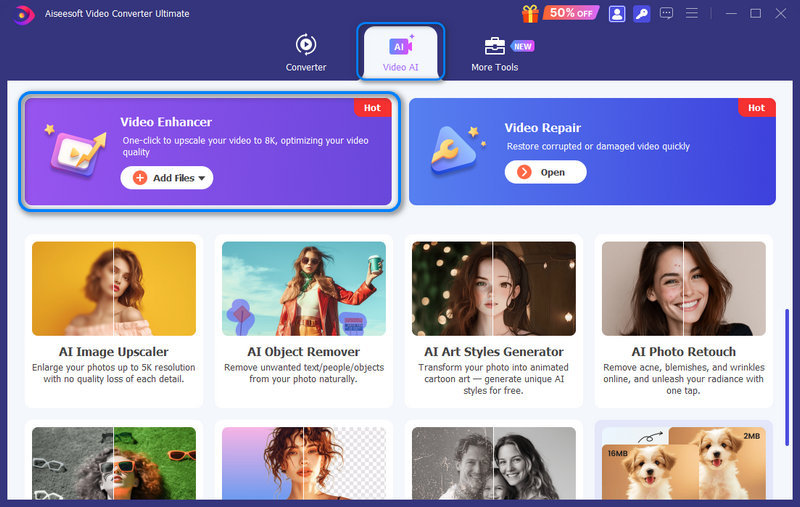
Now you can magically add dynamic metadata to a common SDR video using advanced AI software. These AI-driven tools allow for the conversion of SDR to HDR by intelligently increasing the color gamut and luminance. If you need to turn your SDR videos into HDR with enhanced quality, Aiseesoft Video Converter Ultimate is a leading solution. It utilizes advanced AI enhancement models to analyze the original SDR footage, identify highlights and shadows, and upscale the dynamic range to your desired HDR standards.
100% Secure. No Ads.
100% Secure. No Ads.
Core Features of Aiseesoft AI Enhancer
Steps to Convert SDR to HDR Using AI
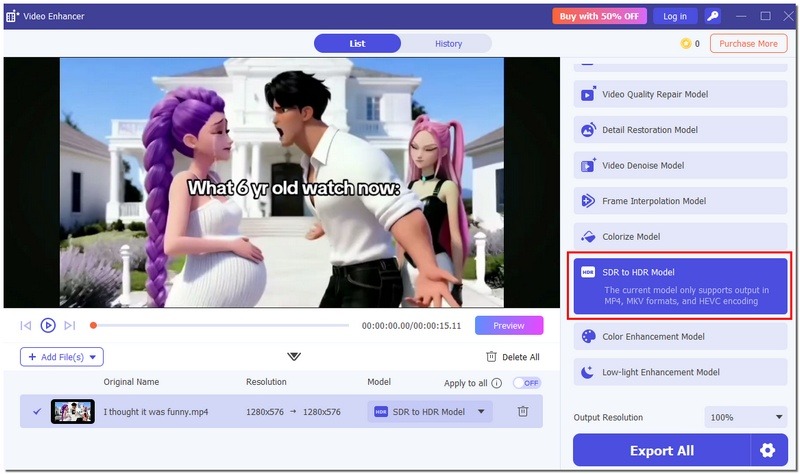
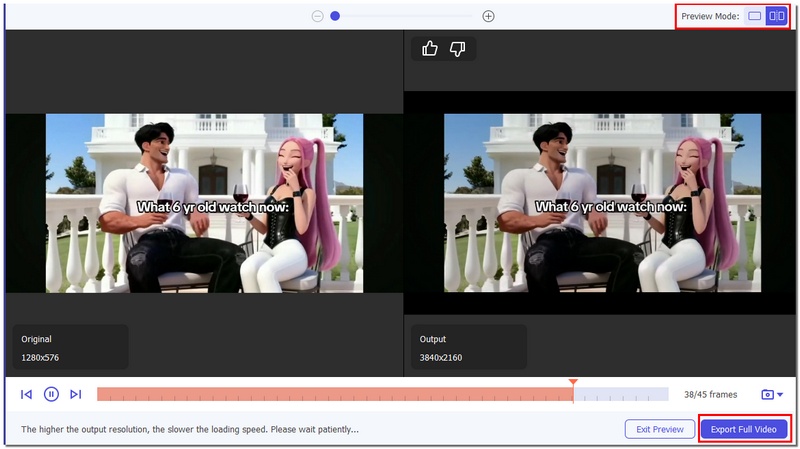
HEVC is the standard codec for HDR packaging. You should select a high-quality format like MP4 H.264 and H.265 (HEVC) for the HDR output. The AI will intelligently analyze the source video and render an HDR version with a wider color palette and boosted highlights.
Is HDR better than 4K?
As you can learn from above, HDR and 4K are two different things. 4K resolution refers to the number of pixels. HDR refers to the quality (color and brightness) of those pixels.
How can I tell if I mm watching real HDR?
When you watch truly HDR content on a modern TV or streaming device, you will see an HDR or Dolby Vision logo in the corner (often the top right) of the screen. The HDR logo appears for several seconds when you first switch to the display mode. Some TVs allow you to check if the HDR is enabled in their settings.
Can I watch HDR on any 4K monitor?
No. Even though many modern 4K monitors are HDR compatible, that does not mean all 4K monitors have the hardware necessary to actually display High Dynamic Range. Some 4K monitors can accept an HDR signal, but they lack the hardware to display it properly. You can look for the specific VESA certification, like DisplayHDR 1000, DisplayHDR 600, or DisplayHDR 400, to tell if your 4K monitor is good at HDR.
Conclusion
If you have shopped for a new monitor, TV, or even a smartphone, you have undoubtedly encountered the term High Dynamic Range (HDR). After reading this post, you can get a deeper understanding of HDR. You should know that it is not a minor iterative upgrade. This display and imaging technology is arguably considered the most significant advancement in visual quality, mainly for the home theater experience in the 4K era. Check various HDR standards, figure out the specific hardware requirements, and get a true HDR viewing experience.
 How to Play 4K Videos & Blu-ray Movies on Windows 11/10/8/7 & Mac
Experiencing choppy 4K playback? Discover the best 4K media players for Windows 11/10 and Mac. Learn how to play 4K UHD videos and Blu-ray movies smoothly.
 A Detailed Guide to Convert H.265 to H.264 without Losing Quality
Do you know how to convert H265 to H264? Discover six lossless H.265 to H.264 converters here and help your films run well on various platforms.
 How to Upscale Video 4K with AI (2026 Guide)
Want to enhance the quality of your video? Feel the video resolution is too low? This post will guide you on how to upscale your video to a higher resolution with a few simple steps.
 Leave your comment and join our discussion
Video Converter Ultimate is excellent video converter, editor and enhancer to convert, enhance and edit videos and music in 1000 formats and more.
100% Secure. No Ads.
100% Secure. No Ads.

*Required field
*Please enter a valid email

