With eye-catching functionalities, Android smartphones still require careful handling. If not, the screen may get broken, even resulting in data loss. Is your Android phone screen broken? Apart from the physical damage, it’s more important to think about how to recover your files.
How can you access Android files and backup Android phone with a broken screen? This article is prepared to help you remotely access your device and safely back up your data, especially for Samsung Android users.
Best for: Completely broken or unresponsive screens
If you accidentally broke your Android phone screen and are not able to use it properly, then relying on a professional tool could be one of the simplest ways for you to back up your Android phone to a PC with a broken screen. First of all, if the computer can still recognize the phone, then you might be able to depend on an Android data recovery software like Aiseesoft Broken Android Data Extraction, which will help you get hold of your essential data without any risk.
Downloads
 100% Secure. No Ads.
100% Secure. No Ads.
Steps to Use Aiseesoft Broken Android Data Extraction
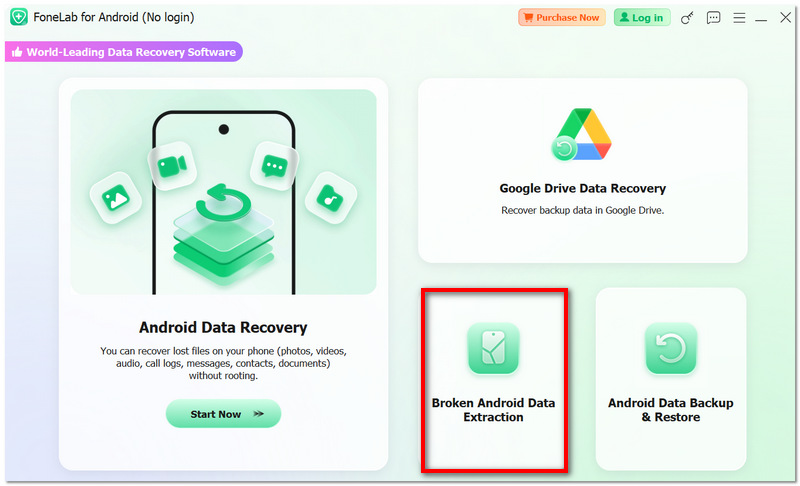
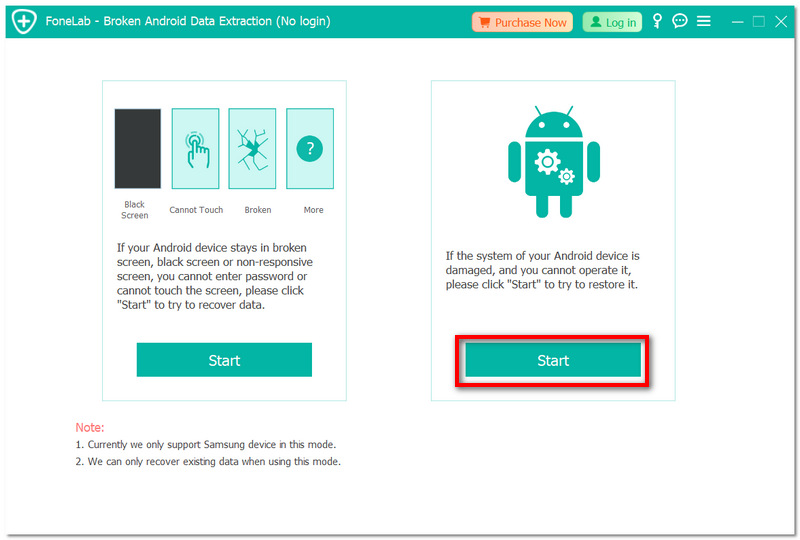
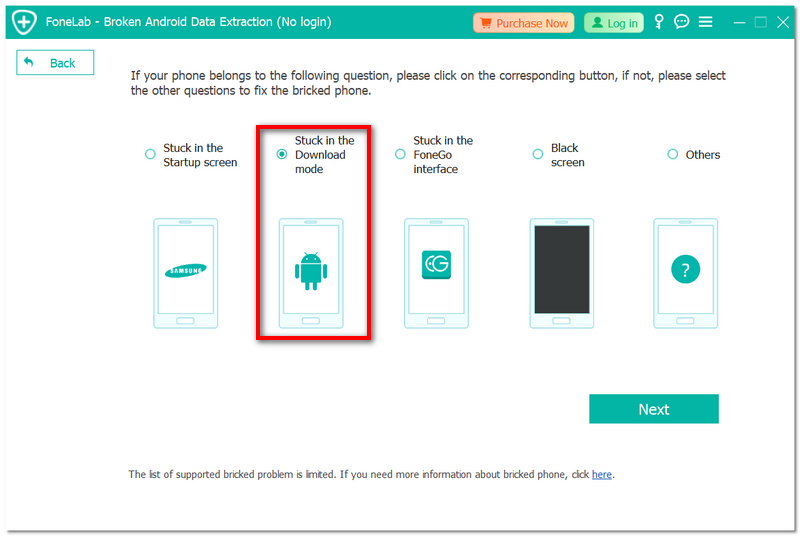
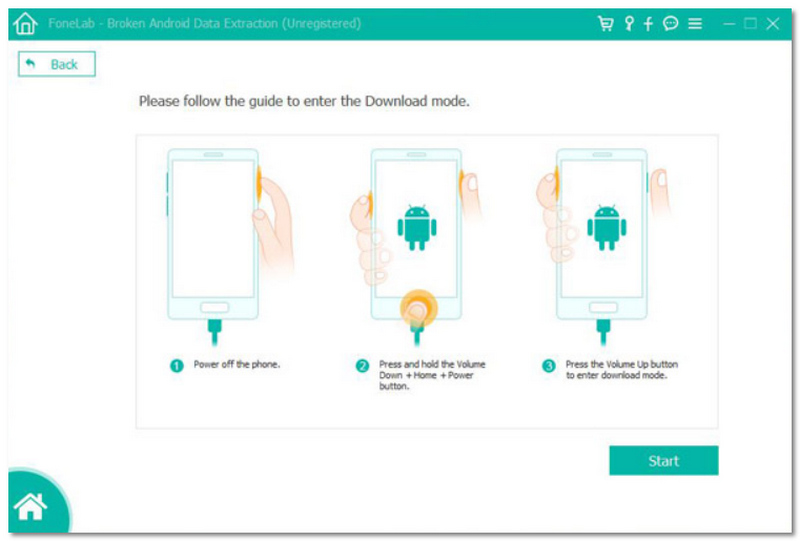
After the process, your Android data will be successfully backed up and accessible on your PC, even with a broken screen.
One of the easiest ways to control your phone and back up your data if the phone screen is broken but still operational is to use an OTG (On-The-Go) adapter. This method enables you to connect a USB mouse to your phone to navigate the screen and transfer files manually. If you are looking for how to back up Android phone when the screen is broken, it is without a doubt a practical solution to do so without the need to install extra software.
Best for
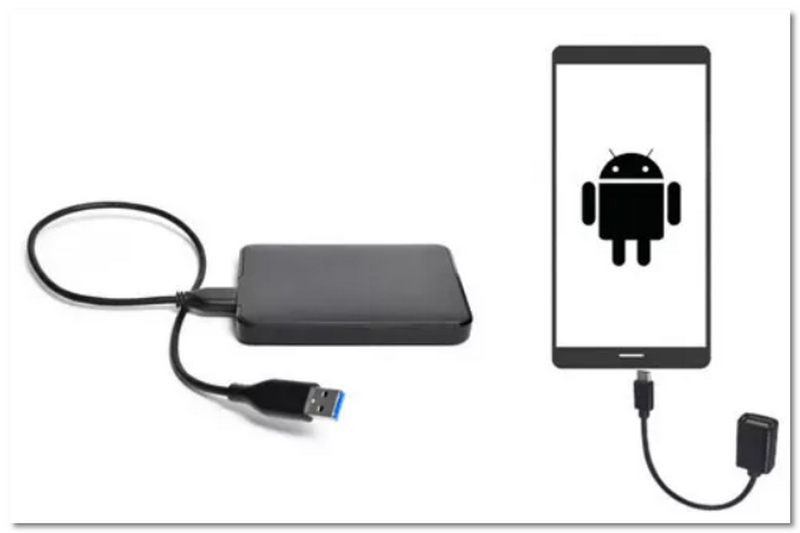
As long as your screen is still viewable, this simple and efficient way lets you manually backup your Android data without the need for sophisticated software.
If you have enabled USB debugging on your phone before the screen broke, then you can employ ADB (Android Debug Bridge) to get your data and back it up via a computer. Though this method is a bit technical, it is quite efficient for those who are looking for how to back up data from an Android phone with a broken screen, without depending on third-party backup applications.
Best for: Devices that already have USB debugging enabled
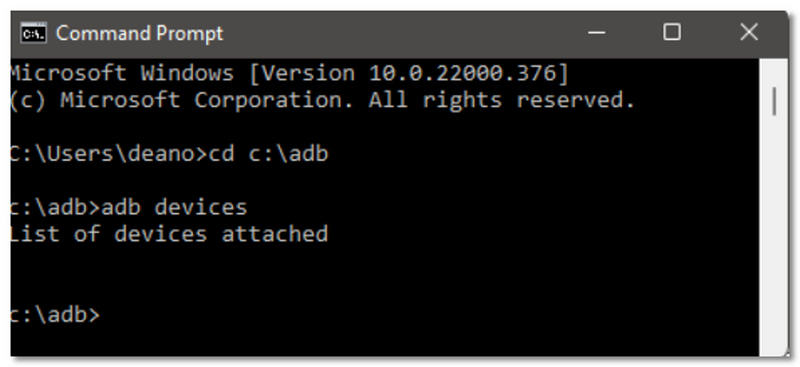
adb backup -apk -shared -all -f backup.ab
With this approach, you can back up your entire Android data to your PC without the need for an operational screen.
Question 1: Can I use the broken smartphone normally if it still vibrates or rings?
Yes, if the phone is still responsive, you can use OTG or connect it to a PC to back up data before it completely stops working.
Question 2: Do I need to root my broken smartphone to recover data?
No, most of the modern recovery tools and methods, such as OTG and ADB (if enabled), do not require rooting.
Question 3: Should I fix the screen first or back up data?
Definitely, first back up your data so that you don't lose it permanently during the fixing or replacement of your screen.
Conclusion
A broken screen on your Android phone can be quite a nuisance, especially when you start worrying about your important files that may be lost. Luckily, this article has presented you with a number of excellent options to help you get to your data and save it.
Indeed, the primary goal is not only to react quickly before the situation becomes irreparable, but also to select the proper method that best fits your circumstances. Once you change your perspective, backup Android phone to PC broken screen will be possible, and you will prevent losing data forever, even if your phone is entirely malfunctioning.
 Recover Deleted Files from Android Internal Storage
Want to recover deleted files from Android internal storage? This guide shows you how to recover deleted videos, photos, text messages on Android.
 Top 5 Android to Android Transfer Reviews You Cannot Miss
Want to transfer data from Android to Android phone free but don't have a suitable Android to Android transfer? This post shows 5 great Android to Android transfer apps for you to choose from.
 Reviews on Best File Manager for Android
What is the best file manager for Android? This article lists top file manager for Android to help you better manage Android files on Windows PC, Mac or app.
 Leave your comment and join our discussion
Provides a simple way to back up and restore all types of files like contacts, messages, call logs, gallery, videos, audio, etc. on your Android device safely and selectively.
100% Secure. No Ads.
100% Secure. No Ads.

*Required field
*Please enter a valid email

