Aiseesoft iKnockin – iPhone Unlocker
 100% Secure. No Ads.
Contents
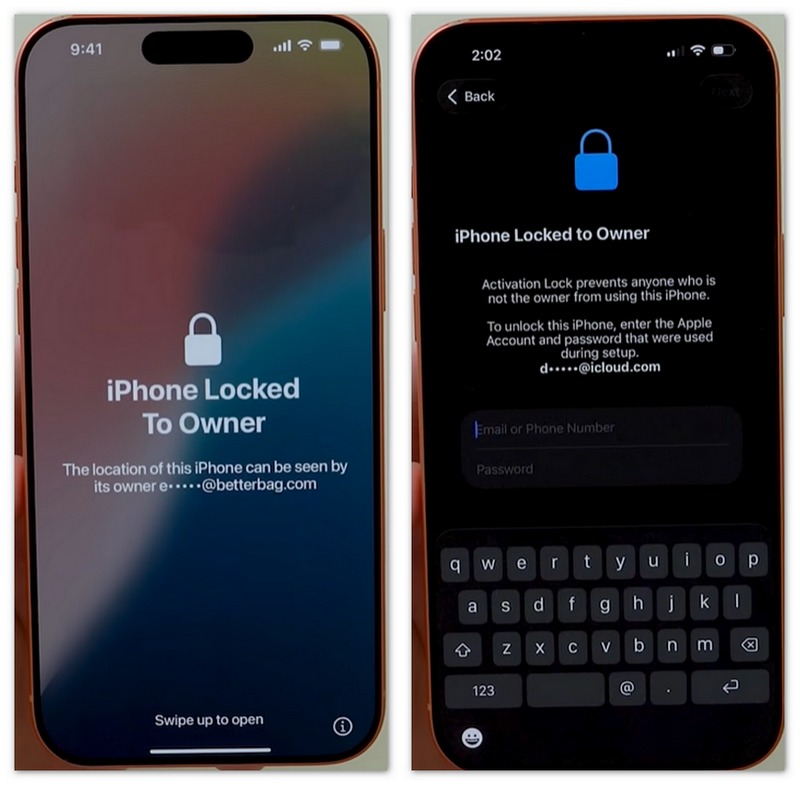
Seeing the "iPhone Locked to Owner" message can be frustrating, especially when you just want to start using your iPhone. But don't worry. It doesn't necessarily mean your device is permanently unusable.
The right solution depends on what is locking your iPhone. You might have forgotten your screen passcode, lost access to your Apple Account, or purchased a second-hand iPhone that is still linked to its previous owner.
In this guide, we'll explain how iCloud Activation Lock works on iOS 27 and walk you through several ways to regain access. We'll also cover what third-party unlocking tools can and cannot do, so you can choose a solution to bypass iCloud-locked iOS 27 without risking unnecessary data loss or spending money on an ineffective service.
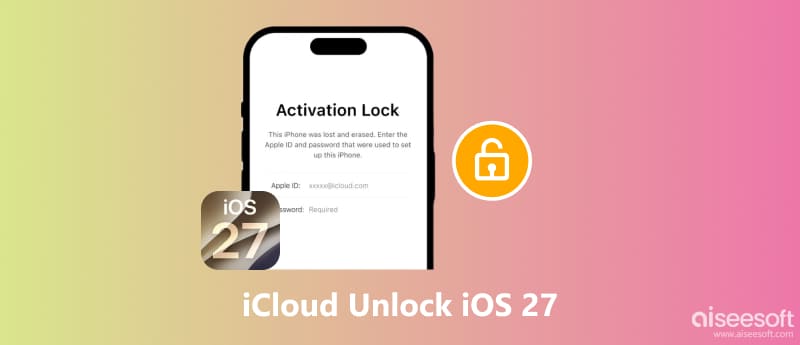
Yes, but the available options depend on the type of lock and whether you own the Apple Account linked to the device.
Before trying an iCloud Activation Lock bypass, you should understand that an iPhone passcode lock, an Apple Account password issue, and Activation Lock are three different problems.
Activation Lock is an anti-theft security feature associated with Find My (Learn more about how to turn off Find My iPhone and remove Activation Lock before selling or transferring your device). When Find My is enabled, Apple links the device to its owner's Apple Account. Even after the iPhone is erased, it may still require the original account credentials before someone can activate and use it again.
Here is a quick comparison to help you identify your situation.
| Lock or Restriction | Why It Happens | Does It Cause Data Loss? | What You Need | Recommended Solution |
| Screen Passcode / Security Lockout | Too many incorrect passcode attempts | Yes, if the device must be erased | Apple Account credentials for reactivation if Activation Lock is enabled | Official erase or recovery mode |
| Activation Lock / Locked to Owner | The iPhone is still linked to an Apple Account | Not necessarily when simply completing activation; remote erasing deletes data | Original Apple Account and password, or the previous owner's cooperation | Sign in or ask the owner to remove the device |
| Forgotten Apple Account Password | You cannot remember your account password | No, when resetting the account password | Trusted device, trusted phone number, or account recovery information | Reset the Apple Account password |
Important: Restoring an iPhone can remove its screen passcode, but it does not automatically remove Activation Lock. These are separate security mechanisms.
If you are seeing "iPhone Unavailable" or "Security Lockout," you should follow an iPhone Security Lockout solution rather than looking for an iCloud Activation Lock bypass. The two situations require different approaches.
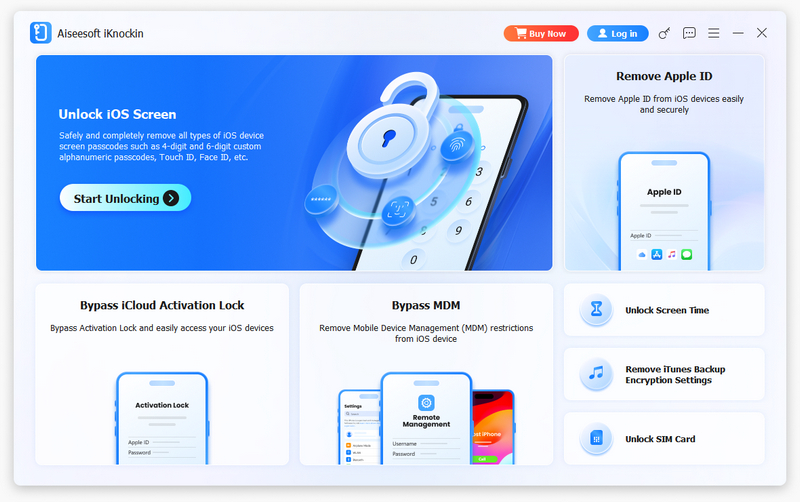
If you are not comfortable using recovery mode or navigating complicated computer procedures, Aiseesoft iKnockin iPhone Unlocker offers a more straightforward interface for several supported iPhone lock issues.
It brings together different unlocking functions, including screen passcode removal, Apple Account-related operations, Screen Time passcode removal, and MDM restrictions.
However, it is important to choose the correct function for your situation.
What Can Aiseesoft iKnockin iPhone Unlocker Do?
100% Secure. No Ads.
100% Secure. No Ads.
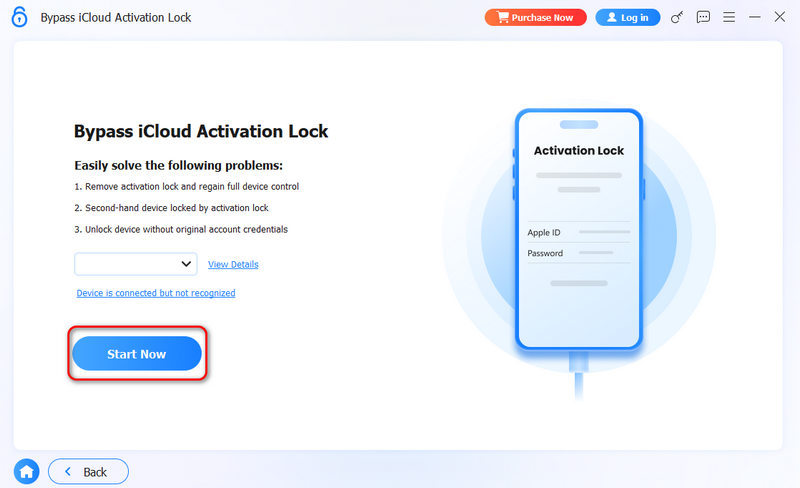
How to Use Aiseesoft iKnockin to bypass the iCloud lock on ios 27:
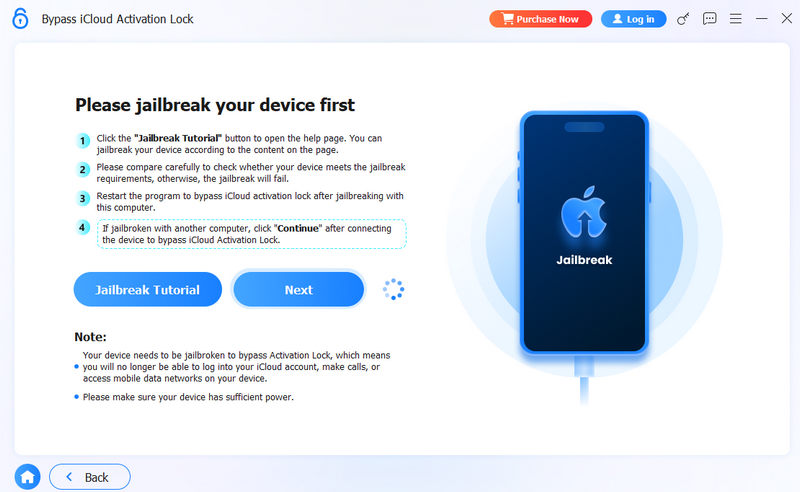
Before trying a third-party solution, consider Apple's official recovery and account-management options. They are generally the safest ways to resolve Activation Lock without relying on unsupported bypass techniques.
If you know the Apple ID and password previously associated with your iPhone, this is the most direct way to complete Activation Lock verification. A stable internet connection is essential in this method. Your iPhone needs to communicate with Apple's activation servers to verify the account information.
Follow these steps:
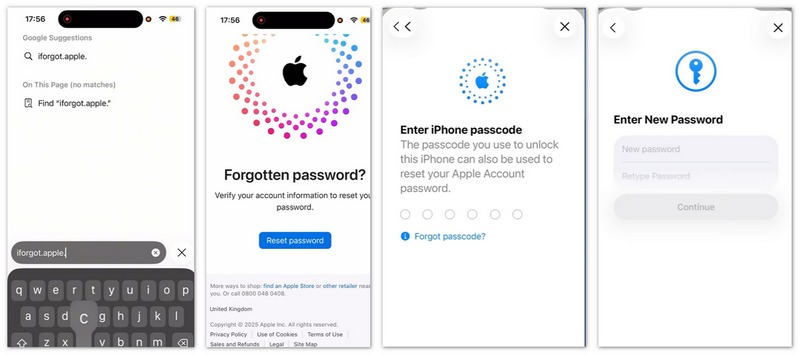
Forgot your Apple Account password? You don't necessarily need to bypass Activation Lock. Resetting your password may be enough to regain access. Apple provides several ways to recover your account, including using a trusted Apple device or its official account recovery service.
Reset Your Password Using Apple's Website:
Now, with your recovered Apple ID account credentials, you can go to the last "Unlock with Your Apple Account" section and follow its steps to unlock the activation lock.
If you cannot reset your password using the usual methods, check out this guide on what to do if you can't reset your Apple ID password.
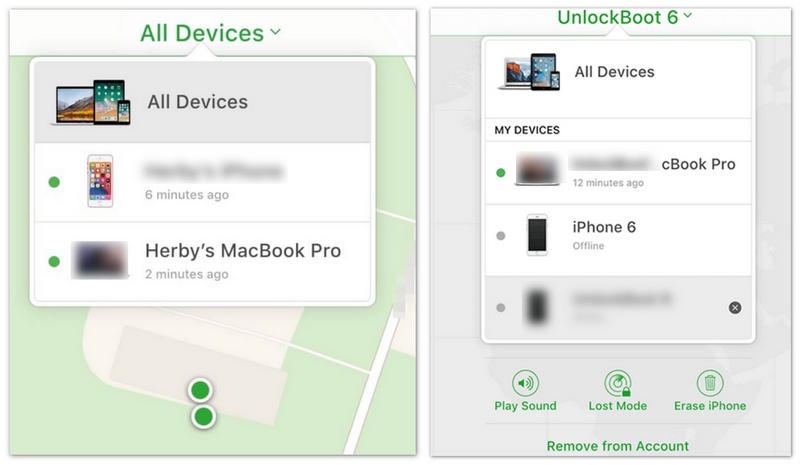
Purchased a second-hand iPhone only to discover that it is still linked to someone else's Apple Account? In this situation, the best solution is to ask the previous owner to remove the device from their account. They do not need to meet you in person or physically access the iPhone.
You can unlock the activation lock by asking them to:
If you are the legitimate owner but cannot access the associated Apple Account, Apple may be able to review an Activation Lock support request. This is particularly useful if you purchased the iPhone directly from an authorized retailer and still have valid proof of purchase.
Here is what to do:
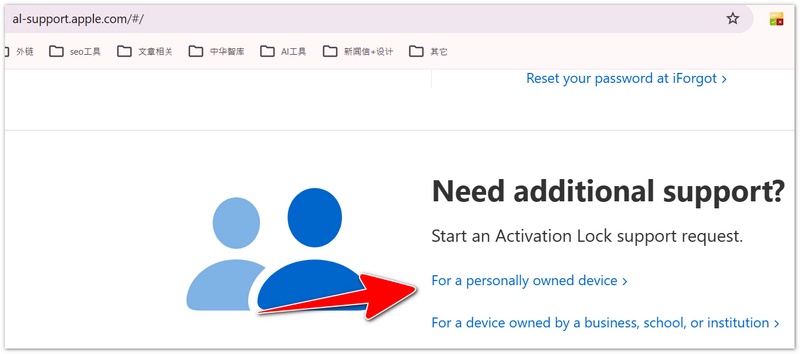
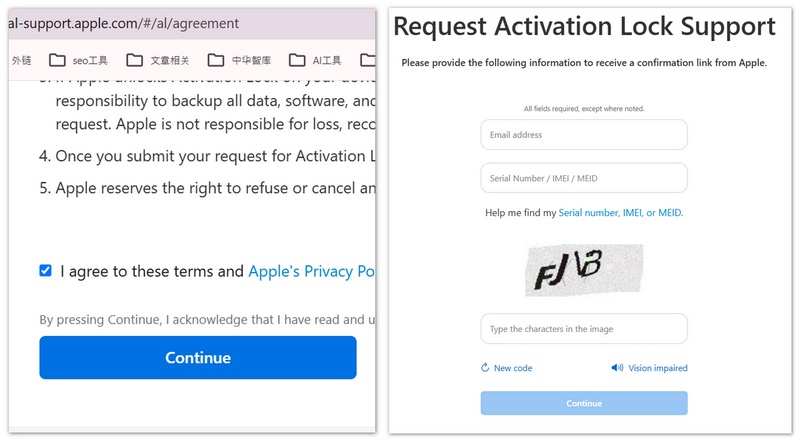
If you purchased the device second-hand, a payment record or message from the seller does not automatically qualify as acceptable proof of ownership. Then, you can go to Part 2 for help.
Do you have an iPad or Mac that is already signed in to the same Apple Account as your locked iPhone? If so, you may be able to reset your password without using the locked device. A trusted Apple device is one of the easiest ways to regain access because Apple can use its existing account authentication to verify your identity.
On an iPad:
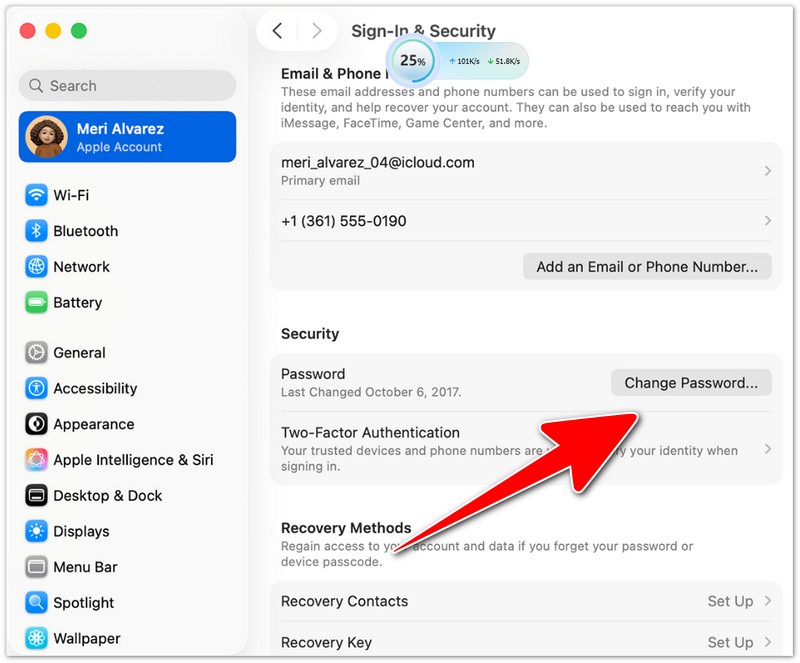
On a Mac:
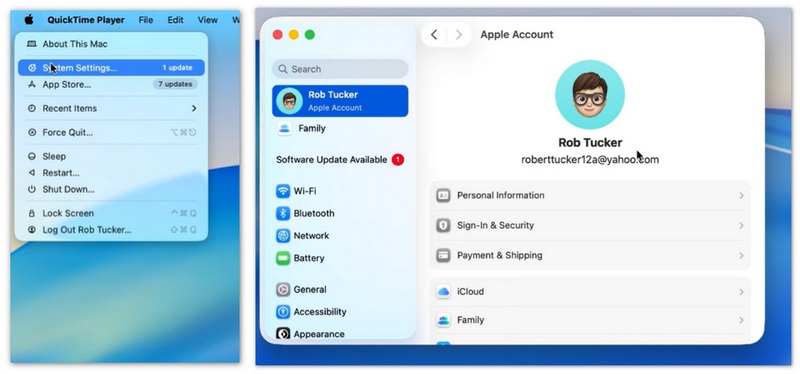
After changing your password, return to the locked iPhone and enter the updated passcode when Activation Lock requests it.
No. Restoring an iPhone with Finder cannot remove Activation Lock. It only erases the device and reinstalls iOS. If Find My was enabled before the restoration, Activation Lock will remain active.
However, restoring your iPhone with a computer can help if you see "iPhone Unavailable" or "Security Lockout" after entering the wrong screen passcode too many times.
How to Restore an iPhone with Finder:
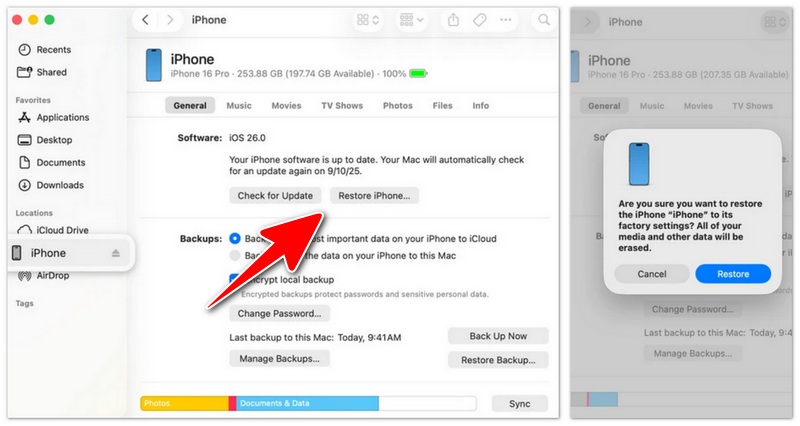
Important: Restoring your iPhone erases all data on the device. If you don't have a backup, you may permanently lose your photos, messages, and other files. After restoration, you'll still need to enter the Apple Account credentials previously linked to the iPhone to pass Activation Lock.
If you don't have access to a Mac, you can also use the Apple Devices app on Windows or iTunes on supported older systems.
Sometimes, even after following the recommended steps, your iPhone may still display an Activation Lock message or fail to complete the setup process. Here are some common problems and their solutions.
If your iPhone continues to display "Locked to Owner", it is likely still associated with the previous owner's Apple Account and you still need to bypass the icloud activation lock.
Try the following:
Restarting the iPhone or restoring it again will not remove an existing Activation Lock.
A factory reset erases the data stored on your iPhone, but it does not automatically remove Activation Lock.
This is because Activation Lock is associated with Apple's activation servers rather than simply being stored in the local device data.
After restoring your iPhone, connect it to the internet and enter the Apple Account credentials previously linked to the device.
If you purchased a second-hand iPhone, ask the previous owner to remove it from their Find My account.
If your Mac or Windows PC does not recognize your iPhone during the recovery process, check the USB connection and device settings before trying again. You can try these solutions:
If your iPhone still cannot be detected, the USB port or physical buttons may need professional inspection.
Is iPhone Unavailable the Same as iCloud Activation Lock?
No. They are two different security features. iPhone Unavailable appears after too many incorrect screen passcode attempts. Activation Lock is used to prevent someone from activating an iPhone linked to another person's Apple Account. You should identify which message appears on your screen before choosing an unlocking method.
Does a Factory Reset Remove Activation Lock?
No. A factory reset erases your iPhone's data and settings, but it does not remove Activation Lock if Find My was enabled. After resetting the device, you'll still need the Apple Account credentials previously associated with it to complete setup.
Will Updating to iOS 27 Remove Activation Lock?
No. Updating your iPhone to iOS 27 or another iOS version does not remove Activation Lock. The feature is tied to your Apple Account and Apple's activation system, not simply to the installed iOS version. You must use the previously linked account or have the device removed from that account.
How Can I Check Whether an iPhone Has Activation Lock Before Buying It?
Ask the seller to erase the iPhone and remove it from their Apple Account before completing the purchase. Then turn on the device and go through the initial setup process. If you see "iPhone Locked to Owner" or are asked for the previous owner's Apple Account during setup, the device is still linked to that account. Do not complete the purchase until the seller removes the lock.
Conclusion
An iCloud-locked iPhone does not necessarily mean your device is permanently unusable. The key for iCloud unlock iOS 27 is identifying the exact problem before trying to unlock it.
If you have forgotten your screen passcode, restoring the device may help. If you cannot remember your Apple Account password, try Apple's official account recovery options or use another trusted Apple device. If you purchased a second-hand iPhone that is still linked to its previous owner, ask them to remove it remotely through iCloud.com. Aiseesoft iKnockin is another option for users dealing with supported iPhone lock issues, particularly those who prefer a simpler computer-based interface.
100% Secure. No Ads.
100% Secure. No Ads.
With the right method, you can avoid unnecessary data loss, wasted time, and unreliable iCloud unlock services.
 How to Free Up Space on iPhone: 7 Tips to Get More Storage
How can I check the current storage usage of my iPhone? How to remove items to increase storage on an iPhone? Learn 7 tested methods to free up space on iPhone.
 Top 5 Methods on How to Download Photos from iPhone to Computer
How to download photos from iPhone to computer? After reading this tutorial, you can know how to transfer/download photos from iPhone to PC.
 Troubleshooting iOS 18/17/16/15/14/13 Update Problems on iPhone and iPad
This post lists the latest iOS update problems on iPhone/iPad/iPod while or after updating to iOS 18/17/16/15/14/13, including iOS update failure, message problems, Wi-Fi issues, etc.
 Leave your comment and join our discussion
To fix iPhone screen locked, wiping password function can help you a lot. And you also can clear Apple ID or Screen Time password easily.
100% Secure. No Ads.
100% Secure. No Ads.

*Required field
*Please enter a valid email