Video Converter Ultimate
 100% Secure. No Ads.
I've tried a decent number of online conversion tools over the years, and some are very simple, and some make basic conversions seem needlessly complex. The moment I want the MP4 audio, I want to upload the file, convert it, and get an MP3 without having to learn a lot of details and options I don't need.
That's the reason I wanted to learn more about the Kapwing MP4 to MP3 Converter. I have heard of it as a free online video editor, but I also learned that it allows you to convert MP4 to MP3 in the browser. I decided to check the conversion myself to see how smoothly it works, what kind of MP3 file the export delivers, and whether there is any potential for frustration. If you're thinking of using Kapwing for your video-to-audio conversions, I've got you covered.
How We Test and Review
We used Kapwing by uploading MP4 files and converting them to MP3s to assess how easy it is to use the tool on a daily basis. We examined how easy it is to upload and export, the time it takes to convert, the quality of the audio output, the user interface, and the features. We also considered limitations and scored it against other MP4-to-MP3 converters.
| Feature | Kapwing MP4 to MP3 Converter | Aiseesoft Free Online Video Converter |
| Platform | Online browser tool | Online browser tool |
| MP4 to MP3 conversion | Yes | Yes |
| Installation required | No | No |
| Video editing | Yes, with built-in editing tools | Basic conversion-focused workflow |
| Audio settings | Limited during simple MP4 to MP3 conversion | Customizable quality, bitrate, sample rate, and audio channels |
| Preview | Yes | Yes |
| Free use | Yes, with free-plan limitations | Yes |
| Best for | Quick conversion and editing in one place | Simple conversion with more audio control |
Kapwing will allow you to import an MP4 video and select MP3 through export options, while Aiseesoft Free Online Video Converter will also have the option to extract MP3 from video, as well as additional options for its quality and parameters.
If you only need the sound rather than the video, you can use an online converter to extract audio from video files without installing desktop software. Kapwing is pretty simple for the MP4-to-MP3 task. You can upload your file, select MP3 under export options, and grab the audio file without having to download anything. I tried out the process to see how it works for a simple conversion.
Steps to Convert MP4 to MP3 with Kapwing
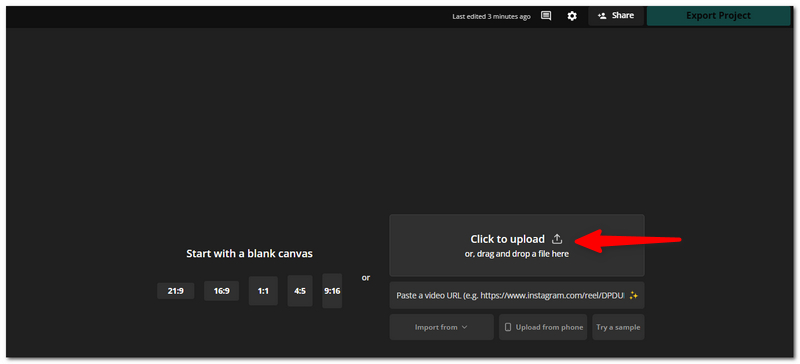
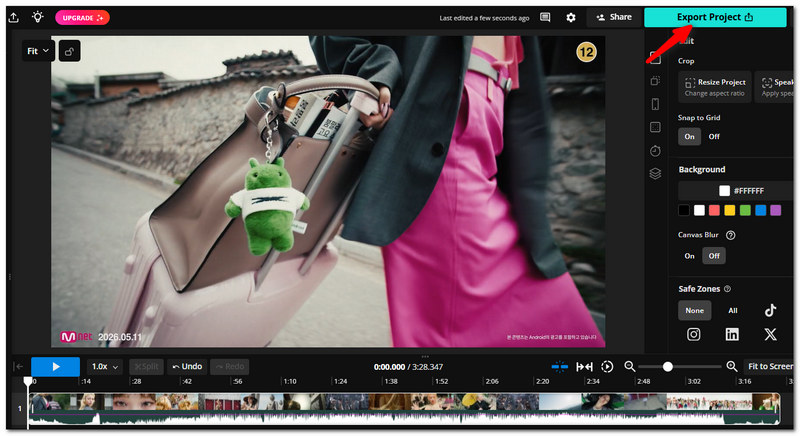
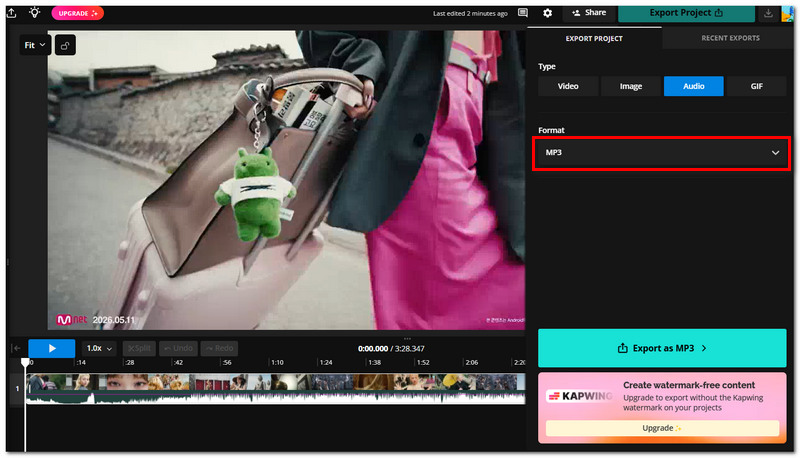
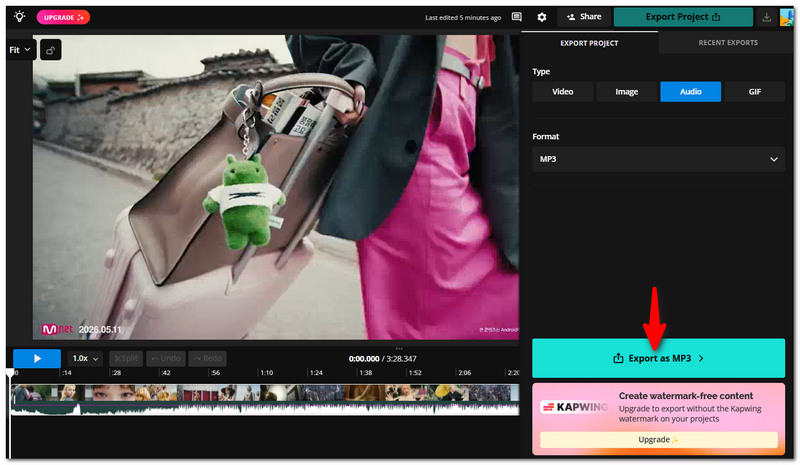
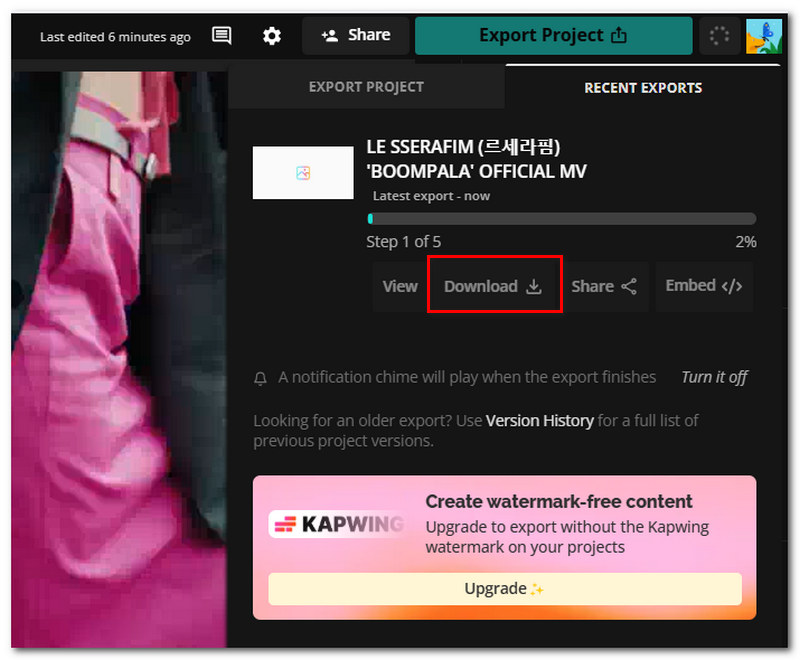
Overall, the Kapwing convert MP4 to MP3 workflow is easy enough for quick conversions, especially if you already use Kapwing for video editing and want to handle the audio extraction in the same place.
After testing the Kapwing MP4 to MP3 workflow, I found it easy to use for quick conversions, mainly if you already use Kapwing for editing.
Strengths
Limits
If audio output settings matter to you, choose a converter that lets you adjust audio bitrate and sample rate before exporting the MP3 file.
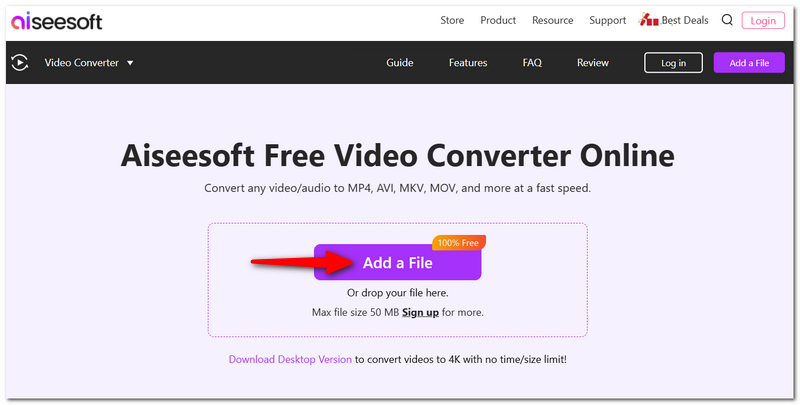
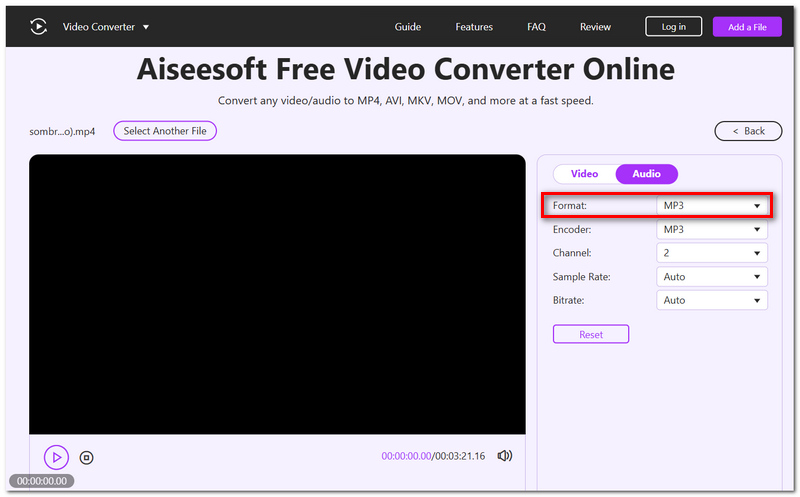
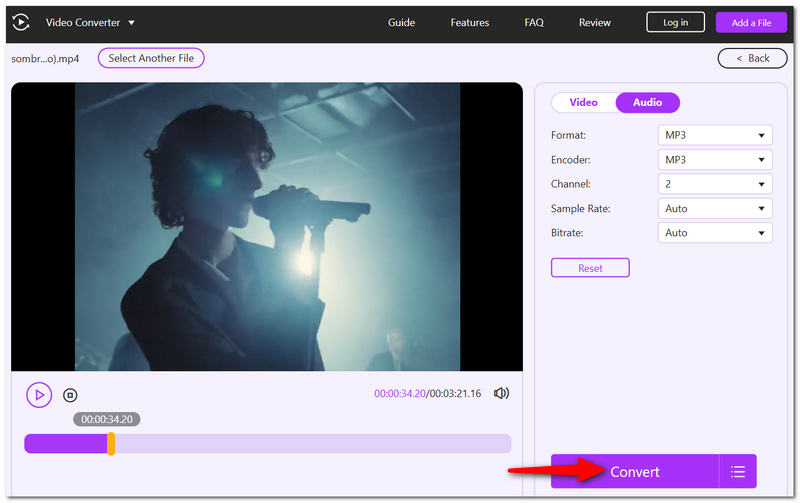
If all you want is to remove audio from an MP4 without needing to go down the path of an all-out video-editing cycle, then Aiseesoft Free Online Video Converter is a simple online option. It's entirely browser-based and allows MP4-to-MP3 video conversion without the need to download any software.
Key Features
How to Convert MP4 to MP3 with Aiseesoft Free Online Video Converter
What happens if my MP4 doesn't contain an audio track?
No, Kapwing is unable to generate an MP3 if there is no existing audio in the project. Since the export options are based on the content in your project, you would need to have an audio track to be able to export as an MP3.
Can I clean background noise before converting MP4 to MP3?
Yes, Kapwing has a tool called Clean Audio that will help minimize background noise before you export the sound. But this isn't the standard MP4 to MP3 conversion. Rather, it's something you'd do when editing the audio.
Can I close my browser while Kapwing is processing the MP3?
If you're logged in, Kapwing will store the project in your Workspace, and you can come back later to check on the export! This is great when you have something that may take a while to process, so you don't have to keep the editor open the whole time.
Why can't I export my Kapwing project as MP3?
One reason could be that your project may not have an audio track. Restrictions on free accounts or an active paid feature will also impact whether you are able to export a project.
Conclusion
After exploring Kapwing, the core of what you learn is that it's an easy-to-use option if you want to output audio from MP4s and still keep the editing options. Its Kapwing convert MP4 to MP3 process is basic enough that you could use it for standard, casual conversions, but if you're looking for finer audio editing features, you might want a dedicated converter. It all comes down to the all-in-one editing tools you want.
 Kapwing Loop Video: Simple Yet Comprehensive App Review
This post will share an in-depth review of the Kapwing loop video program to learn about its nitty-gritty and how it can help you.
 Master How Kapwing Reverses Videos in Less than a Minute
By reading this tutorial guide, you will learn how to reverse videos online with Kapwing. Check out here and learn another video reverse app.
 MP3 VS MP4: How about Their Audio Quality and File Size?
MP3 is generally audio-only file while MP4 is a multimedia facilitator. This article will tell you the differences, so that you can use them properly.
 Leave your comment and join our discussion
Convert/Download/Edit SWF
1.1 SWF 1.2 SWF to MP4 1.3 SWF to GIF 1.4 SWF to MOV 1.5 SWF to HTML5 1.6 SWF to AVI 1.7 SWF to WMV 1.8 SWF to 3GP 1.9 SWF to DVD 1.10 SWF Converter Mac 1.11 Edit SWF
Video Converter Ultimate is excellent video converter, editor and enhancer to convert, enhance and edit videos and music in 1000 formats and more.
100% Secure. No Ads.
100% Secure. No Ads.

*Required field
*Please enter a valid email