Video Converter Ultimate
 100% Secure. No Ads.
What’s the main difference between M4A and M4B? Is it necessary to convert between them? What benefits do I gain?
If you are an Apple user and have ever downloaded an audiobook or ripped a CD into iTunes, you might be familiar with audio files with both “.m4a” and “.m4b” extensions. You have probably used them without giving it much thought.
This M4A vs. M4B article explains the real difference between two audio formats, when to use which, and how to convert between them when you need to.
M4A is the audio-only extension of the MPEG-4 container, which was popularized by Apple as a more efficient alternative to MP3. You can think of it as an MP4 file carrying audio only. It typically carries audio encoded with AAC. Compared to MP3, the key advantage of M4A is that it delivers better sound quality at the same bitrate.
M4A can hold music, podcasts, voice memos, and audiobook content. However, this format is not specifically designed for audiobook purposes. An M4A file cannot carry the same audiobook-specific metadata structure as a dedicated audiobook format.
M4B is generally considered the same container as M4A. It uses the MPEG-4 standard and is often compressed with AAC. It is an audio container with a memory. The .m4b extension identifies an MPEG-4 audiobook. M4B is built specifically for long-form spoken content, such as audiobooks, podcasts, and lecture series.
The chapter markers let you skip between chapters as if you were navigating tracks on a playlist. Moreover, bookmarking remembers your exact playback position. That allows you to pause and resume freely.
Both M4A and M4B are MPEG-4 audio containers, and they look almost identical. However, M4B can hold chapter markers and bookmarks. This section gives you a quick side-by-side comparison.
| Feature | M4A | M4B |
| Purpose | General audio: music, podcasts, voice recordings | Audiobooks and long-form spoken content |
| Bookmarks/Chapters | No built-in chapters or bookmarking support, not the primary design focus | Full support for chapter markers and resume bookmarks |
| Typical codec | AAC (lossy) or ALAC (lossless) | Almost always AAC (lossy) |
| Best device support | iPhone, iPad, Android, Windows, Mac, most modern players | Optimized for Apple Books, iTunes, iPhone, iPad, Mac, and major reader programs Less native support on Android/Windows |
As mentioned, M4A and M4B usually share the same AAC audio. So you can’t convert between them to improve sound quality. The conversion also does not add chapters. If the M4A has no chapter metadata, the converted M4B won’t have chapters either.
Generally, the conversion is mainly for file behavior. M4B (supports bookmarking and resume playback) is treated by apps as an audiobook, while M4A is treated as music or general audio. Moreover, if the source audio file already contains chapter metadata, an M4B conversion can preserve it and let you skip between chapters. Audiobook or reader apps can recognize M4B and provide chapter menus, position memory, and other features.
In some cases, when your player or device fails to play M4B files, you can convert them to M4A. M4B is mainly optimized for Apple’s ecosystem. Some Android or Windows players can't support its audiobook-specific features.
If you prefer a lossless conversion, Aiseesoft Video Converter Ultimate is a great option. The software handles both audio and video. Moreover, it supports batch conversion and lets you choose M4A or M4B as an output profile. This converter can preserve the audio stream and audiobook metadata when possible.
100% Secure. No Ads.
100% Secure. No Ads.
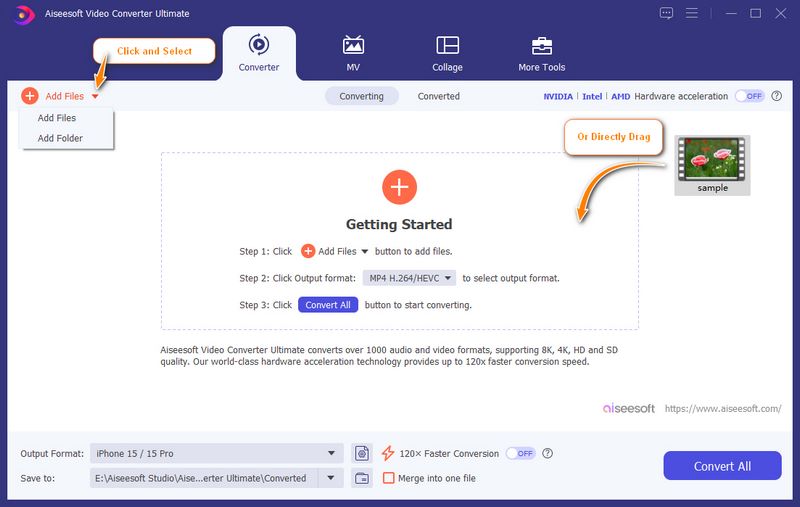
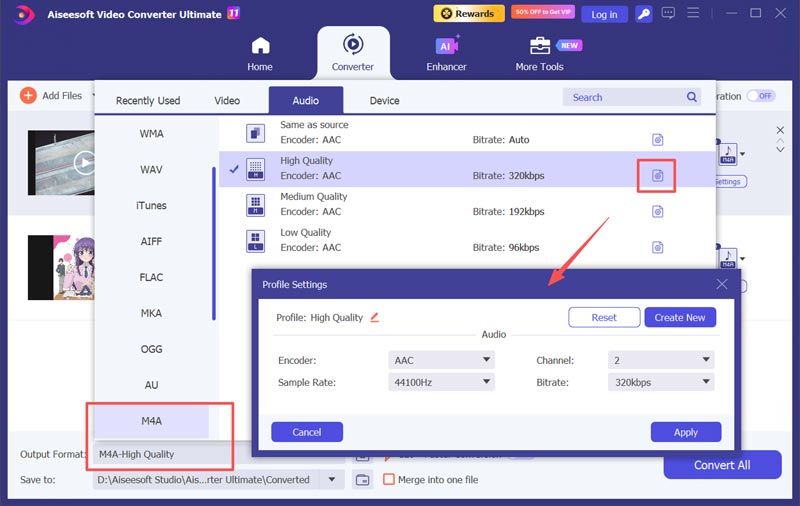
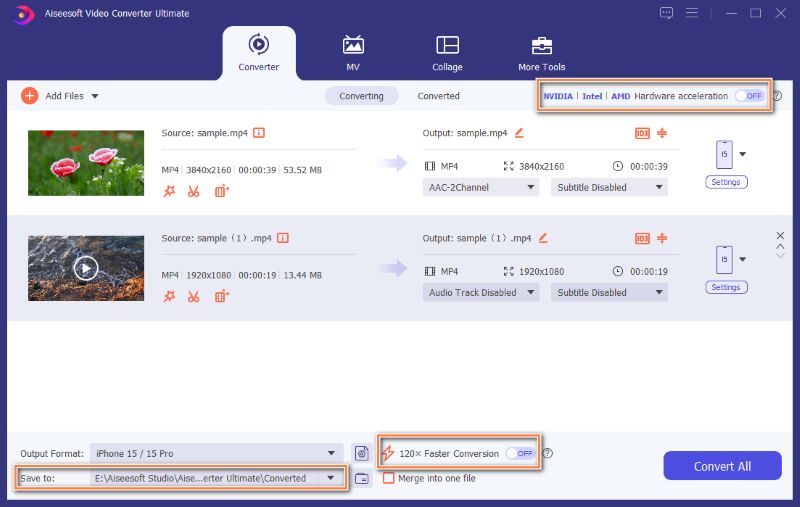
Note that this converter is not a dedicated audiobook tool. If your source file lacks chapter metadata, the converted M4B will not generate chapters. What’s more, the conversion may not work with M4B files that come from the iTunes Store with FairPlay DRM.
Question 1. Is M4B higher quality than MP3?
Yes, M4B often delivers higher audio quality than MP3 at the same bitrate. M4B is often compressed with AAC, which is the superior format. As the successor to MP3, it is more efficient at squeezing high-quality sound into smaller files. Compared to MP3, M4B can offer better sound and audiobook-specific features.
Question 2. What is the best audio format for audiobooks?
M4B is the best audiobook format for most users or listeners, especially in Apple’s ecosystem, thanks to chapter markers, bookmarking, and efficient AAC compression. However, for universal compatibility across Android, Windows, cars, and older devices, universal compatibility across Android, Windows, cars, and older devices.
Question 3. Which one should I choose, M4A or M4B?
If you want to play audio on most modern devices and players, such as a Windows PC, an Android phone, or a car stereo, you’d better choose M4A. However, if you are dealing with audiobook content inside Apple’s ecosystem, M4B is your ideal choice. The chapter and bookmark features are essential and useful.
Conclusion
You can learn all the necessary information about M4A and M4B through the article. M4A is a flexible audio container that plays almost anywhere. In most cases, you can use it to store your audio. M4B is the same technology, mainly designed for long-form listening with chapters and bookmarks. If you are managing a music library or sharing audio across devices, stay with M4A. If you are handling audiobooks, choose M4B. When you need to convert between them, turn to a straightforward converter like Aiseesoft Video Converter Ultimate.
 How to Convert M4A to MP3 Losslessly with 5 Tools [Solved]
The detailed guide will tell you how to convert M4A to MP3 online and on a computer. You can follow the 5 methods to make your M4A to MP3 conversion here.
 WAV to M4A - 5 Efficient Methods to Convert Audio Files
Convert WAV to M4A audio files and play your music while saving more space. Discover the steps and tools you need in this post.
 Top 6 Tools to Convert Your FLAC to MP3 on Desktop or Online
Here, we offer you 6 tools offline and online to turn FLAC into MP3 format. You can follow up on this step-by-step tutorial to quickly acquire your MP3.
 Leave your comment and join our discussion
Convert/Download/Edit SWF
1.1 SWF 1.2 SWF to MP4 1.3 SWF to GIF 1.4 SWF to MOV 1.5 SWF to HTML5 1.6 SWF to AVI 1.7 SWF to WMV 1.8 SWF to 3GP 1.9 SWF to DVD 1.10 SWF Converter Mac 1.11 Edit SWF
Video Converter Ultimate is excellent video converter, editor and enhancer to convert, enhance and edit videos and music in 1000 formats and more.
100% Secure. No Ads.
100% Secure. No Ads.

*Required field
*Please enter a valid email