
Aiseesoft Video Converter Ultimate
 100% Secure. No Ads.
100% Secure. No Ads.
When you search for a video upscaler to sharpen low-resolution clips or enhance old recording footage, you can easily find Topaz Astra. You may be interested in its advanced creative upscaling technology.
Considering that Topaz Labs has built its reputation on AI-powered image and video enhancement, you would like to give the software a try. However, like Topaz Video and Topaz Photo, Topaz Astra is not a free tool. The real question on your mind is: Is Topaz Astra a worthy investment? Check out our in-depth review to help you make your decision.
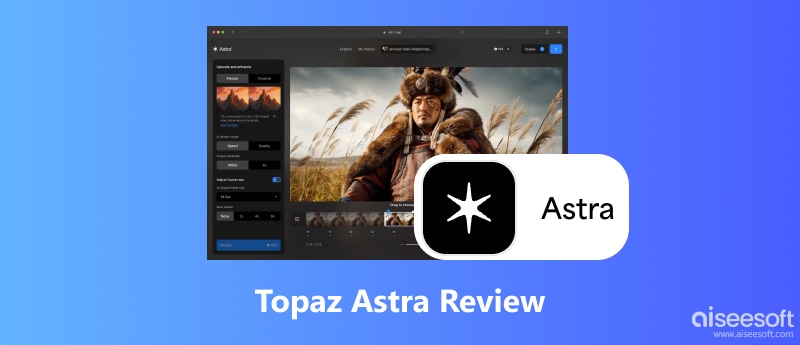
Topaz Astra is an AI-powered video upscaling and enhancement tool developed by Topaz Labs. The software is mainly used for creatives and storytellers to upscale AI-generated video clips and add fine details. Unlike previous models, Astra uses advanced generative AI to upscale resolution and enhance quality. It can reimagine and reconstruct missing data in the source low-resolution video.
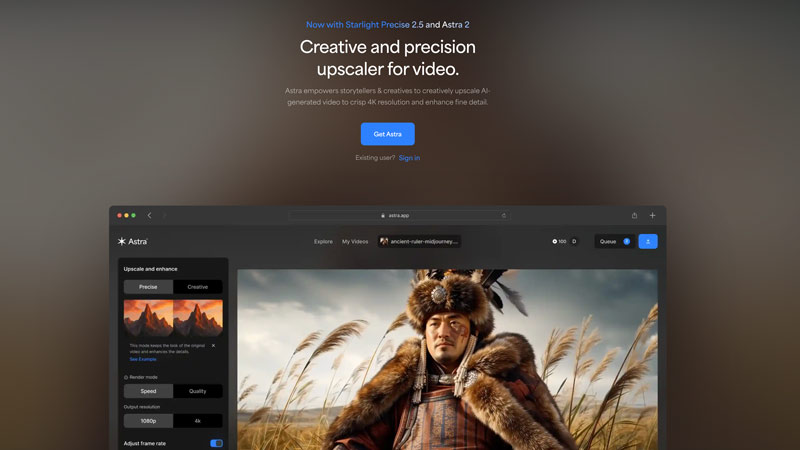
Topaz Astra is specially designed for upscaling. The software provides two different modes for processing. You can select either Creative or Precise according to your needs.
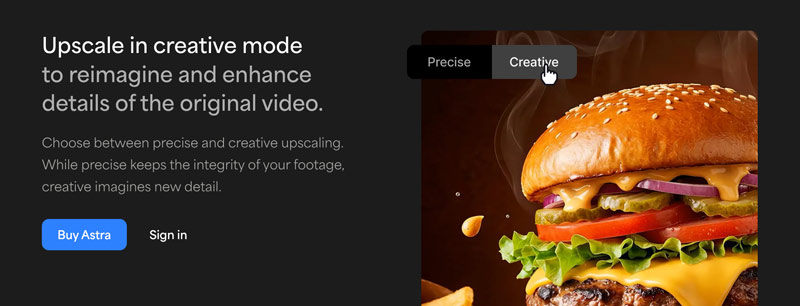
Creative Mode: This is the biggest difference between other AI upscaling modes. This mode is specially designed for severely low-resolution or highly compressed footage. The source detail in the footage is often completely gone. Traditional upscaling methods cannot deliver satisfactory enhancement results. The AI will intelligently reimagine and generate new textures.
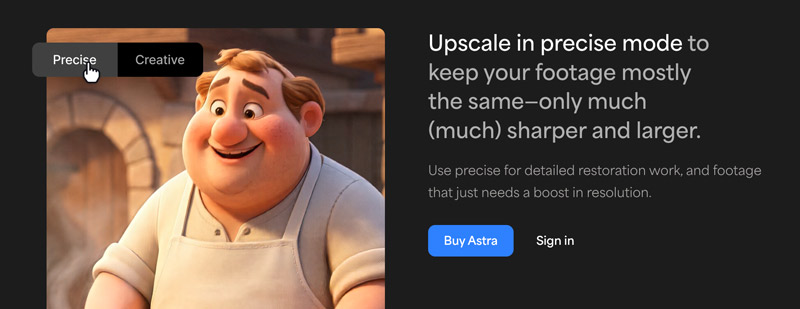
Precise Mode: This mode will maintain the source details of your footage. It is designed for preservation. The AI model only sharpens your video based on the original data. It can reduce noise and compression artifacts. However, the whole upscaling process will not add new details.
If you are familiar with Topaz Video, you should be confident in Astra’s upscaling capabilities. The software is often considered the best in the current upscaling market. In most cases, it can generate the best possible result.
We tested Topaz Astra on multiple 720p and 1080p videos to evaluate 4K upscaling results. Compared with other AI-powered upscalers, the results are often better, with sharp and natural details. Moreover, we used its Creative mode to handle highly compressed 480p web videos. The enhanced quality is also fine. However, the final results are unstable in this mode. Like other similar AI models, Topaz Astra may generate incorrect details.
The annoying thing is that Topaz Labs does not offer a trial version to test Astra’s upscaling capabilities. What’s worse, the software is much more expensive than its competitors. That’s why most users hesitated, wondering whether it was worth the price.
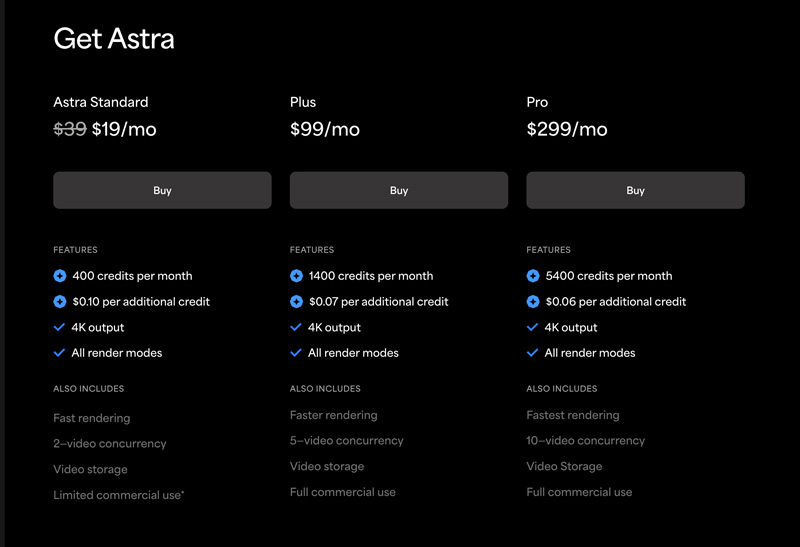
PROS
PROS
Topaz Astra is mainly designed for professionals and serious creators who often need to upscale lower-resolution footage.
If you are a professional editor and regularly handle many upscaling tasks, Topaz Astra can be an ideal tool for achieving the best possible results.
However, for most casual users, Astra is not worth the investment. It only offers features for video upscaling, sharpening, and enhancement needs. If you want to quickly increase resolution, sharpen edges, edit footage, optimize effects, and perform other operations to improve quality, Astra is not a good option. And its upscaling capabilities could be overkill for general users.
Most users don’t need a standalone upscaler that requires a powerful computer to process. Not to mention it comes with expensive plans. Before purchasing Topaz Astra, you should try using other AI-powered video upscaler and enhancer tools.
You should know that many AI tools can deliver the same enhancement quality as Topaz Astra for most casual tasks. If you prefer reliable AI enhancement built into a powerful video toolkit, Aiseesoft Video Converter Ultimate is a great alternative to replace Astra. It has a dedicated AI Enhancer for you to perform upscaling, sharpening, noise reduction, stabilization, color optimization, and other operations. Multiple advanced AI models are provided for related enhancements.
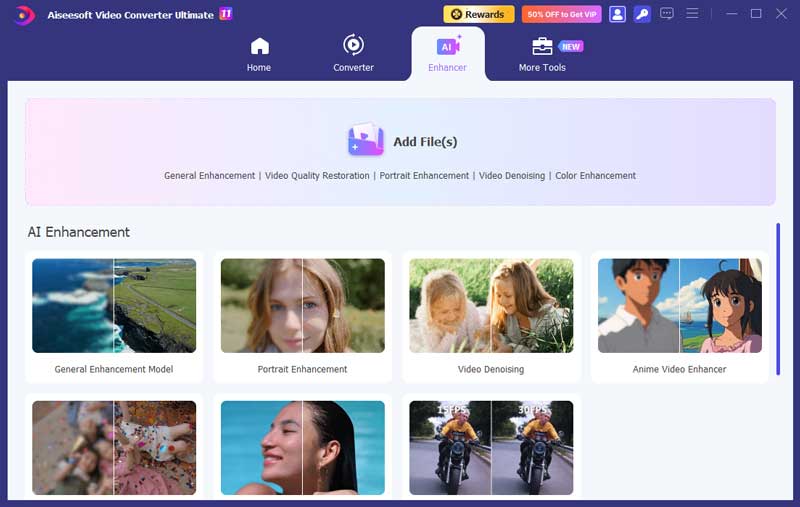
As a Topaz Astra alternative, it lets you upscale lower-resolution footage to 4K or even 8K with added detail. Like Astra, Aiseesoft AI Enhancer can analyze the source video and intelligently generate correct new data. For most upscaling tasks, this alternative can produce natural, artifact-free results with the same quality as Astra. In addition, the software provides all the necessary editing, conversion, and enhancement functions. You don’t need to switch between several tools.
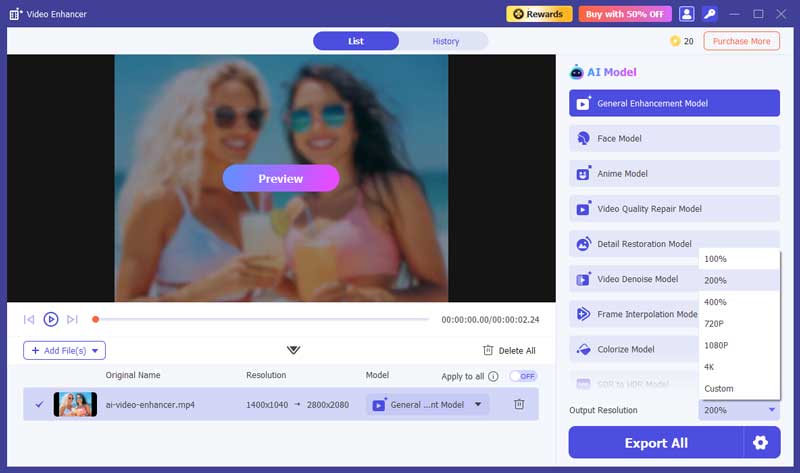
This Topaz Astra alternative does not need powerful hardware to process. It adopts the latest hardware acceleration technology to ensure your upscaling and other enhancements are completed quickly. More importantly, it offers a trial version to test its editing and upscaling capabilities. You can freely apply different AI models and compare their results. Just click the Download button and start a free trial.
100% Secure. No Ads.
100% Secure. No Ads.
Question 1. Does Topaz Astra offer a free trial version?
As mentioned above, Topaz Labs currently does not offer a trial version of Astra. When you try downloading the software and start a trial, you will be prompted to purchase a plan first, such as Astra Standard, Plus, or Pro.
Question 2. Does Topaz Astra support 8K upscaling?
No, Topaz Astra does not support 8K upscaling. It only allows you to increase the source’s lower resolution to 4K natively. If you want to output 8K, you can turn to Topaz Video, Aiseesoft Video Converter Ultimate, or DaVinci Resolve.
Question 3. Does Topaz Astra replace Topaz Video?
No, Topaz Astra does not replace Topaz Video AI. They are designed for different workflows and enhancement needs. Topaz Video is a traditional desktop application primarily used for local processing. It used classic, precision models to upscale, sharpen, and denoise footage. In contrast, Topaz Astra is a web-based upscaler that works through Topaz’s remote cloud servers. It also has a unique Creative mode for inventing new details.
Conclusion
This Topaz Astra review provides the necessary information about this AI-powered video upscaler. Since it does not have a trial version, you must purchase it first. Astra is an invaluable tool for professionals. As a general user, you are advised to start with other video upscaling and enhancement tools.
 5 Best Topaz Video AI Alternatives - Free & Paid
Is Topaz Video free or does it offer a free trial version? Are there good free alternatives to Topaz Video? Check the five Topaz Video AI alternatives.
 4 Free Open Source Video Upscalers [Windows, Mac & Linux]
Seeking the top free open-source video upscalers? Explore the four best tools, their pros & cons, and a bonus, an easier solution.
 Topaz vs HitPaw Video AI: Features, Price, Speed & Best Choice
Compare Topaz vs HitPaw Video AI in features, pricing, speed, and results to see which AI video enhancer is better for your editing needs.
 Leave your comment and join our discussion
Video Converter Ultimate is excellent video converter, editor and enhancer to convert, enhance and edit videos and music in 1000 formats and more.
100% Secure. No Ads.
100% Secure. No Ads.

*Required field
*Please enter a valid email

