Viber is a fantastic messaging and calling app, which can help you communicate with your friends on a free call. It can automatically detect which of your contacts already have a Viber account, and see who else has recently joined, so you can easily make Viber free calls and messages to them on any network. It sounds cool, right?
However, there are still some issues with this app for users. One of the most frequently asked questions is how to recover deleted messages on Viber. So here, we gather the full guide of Viber messages and call recovery on iPhone and Android, so that you can deal with the problems in minutes when using Viber.

You can always recover Viber messages, calls, and attachments etc. via automatic backup or manual backup, no matter whether you are using Android or iOS devices. Google accounts and iCloud have an automatic backup function, and Viber also allows you to back up information manually within this app.
This may be the easiest way to recover Viber data if you have a backup.
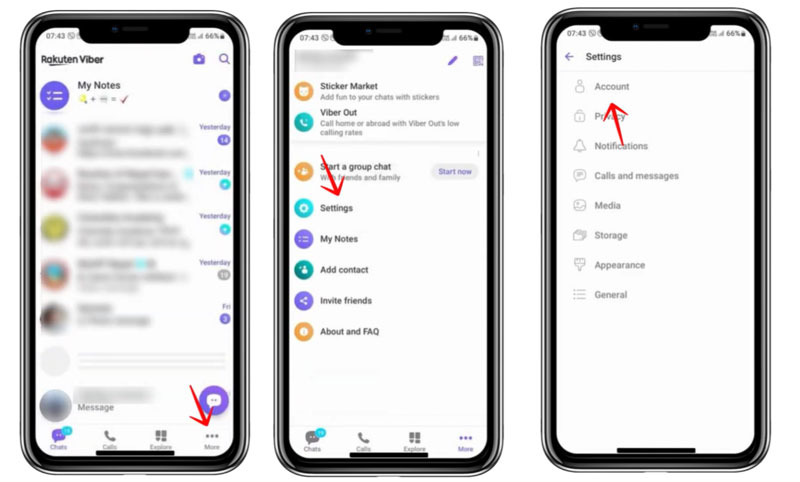
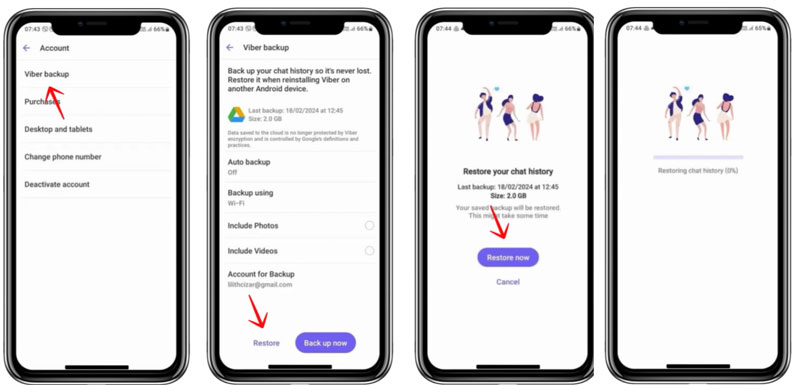
You can also restore Viber data from backup by reinstall the app. This method is better if you want to restore deleted Viber messages and calls on the new device.
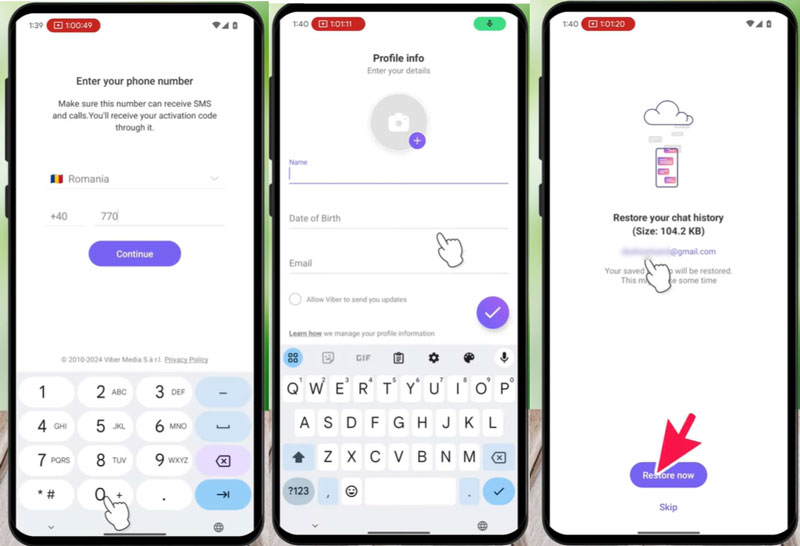
Tips: This only works when you have a Viber backup and you need to make sure your deleted Viber messages and calls are not overwritten by the new backups. In addition, if you have another backup like an iTunes backup, you can also try to recover from iTunes.
Restore via backup is quick and easy. However, not everyone has a backup file and not all deleted messages and calls can be recovered. You deleted messages can be overwritten by new backups and then you can not restore from backup then. If you meet this problem, you can turn to Aiseesoft iPhone Data Recovery for help. It can easily scan and recover the deleted Viber messages, calls and attachments. Besides, you can also recover lost/deleted text messages from iPhone, iPad and iPod.
 100% Secure. No Ads.
100% Secure. No Ads.
After you have downloaded and installed this quick and safe iPhone Viber message and call recovery program on your computer, launch the program and connect your iPhone to it via USB cable.
After you open the program, you will see the interface, which has three options on the left sidebar. Choose "Recover from iOS Device" and click "Start Scan".
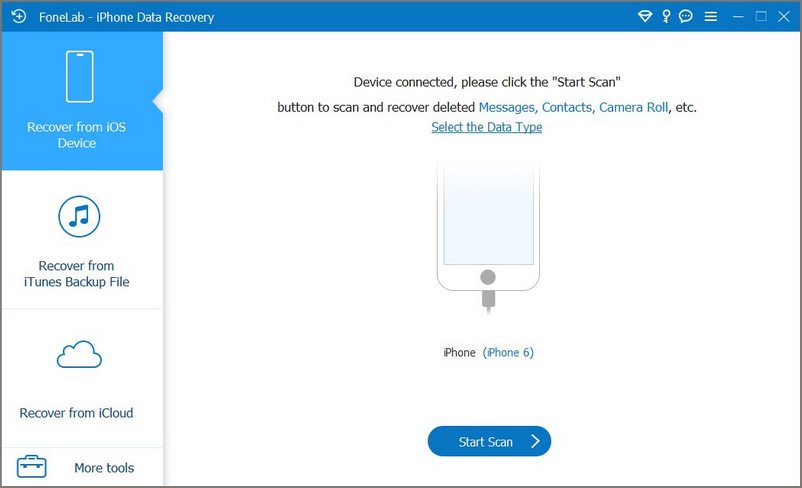
After the program has scanned the iPhone, the program will show you all the data types in your device on the left sidebar.
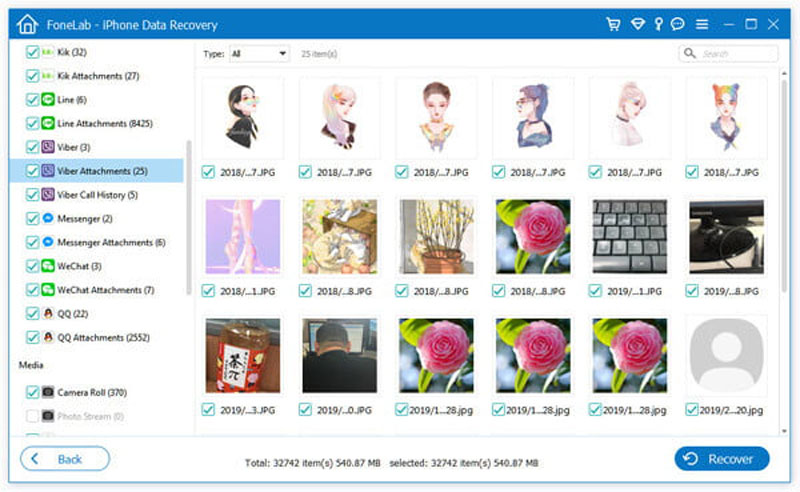
On the left, you will find Viber, Viber Attachments and Viber Call History under the section of "Message & Contacts".
At the top of the interface, you can select the types of files. Click "Show Deleted Only" to see the deleted Viber data only.
By the way, the data with the dustbin marked and Viber messages or contacts in red are also the deleted data. Tick the deleted messages and calls you want to recover and click Recover.
After a few minutes, the deleted Viber messages and calls you selected will be recovered to your computer.
Are Viber calls completely free?
Viber does not charge you to make free Viber call to another Viber user.
However, these calls require:
a cell phone (or validated PC)
a mobile number
Internet data
an installed Viber application.
Can Viber no longer be used for free calls?
If the other contact with Viber account is offline, it asks to dial directly to mobile number using your Viber credit. Other than this, it works as usual.
These two apps work with plenty of the same features.
Viber is free to use when it comes to Viber to Viber VoIP calls and messaging.
WhatsApp is free for the first year. Once the first year is over, the cost of using WhatsApp is $1 per year.
When you call people who do not have Viber app, it will cost you about 1.9 cents a minute.
What's more, Viber has been offering both video and voice calling for a far longer time than WhatsApp has.
Viber also provides the hidden chat features that WhatsApp does not have, so that you can keep the chat messages private.
Who is better, you may know that.
Viber VS WhatsApp, which one is better?
These two apps work with plenty of the same features.
Viber is free to use when it comes to Viber to Viber VoIP calls and messaging.
WhatsApp is free for the first year. Once the first year is over, the cost of using WhatsApp is $1 per year.
When you call people who do not have Viber app, it will cost you about 1.9 cents a minute.
What's more, Viber has been offering both video and voice calling for a far longer time than WhatsApp has.
Viber also provides the hidden chat features that WhatsApp does not have, so that you can keep the chat messages private.
Who is better, you may know that.
Can I call someone in another country with Viber for free?
Yes, as long as that person is on Viber, it doesn't matter whether you are in the same country. You can make free calls and messages as long as you connect Wi-Fi.
Can I use Viber on my iPhone or my Samsung phone, even my Windows 10?
Yes. Viber provides more versions for users to download for iPhone, iPad, Android phone, Windows, Mac and Linux.
How can I download Viber?
You can download by going its official site, and find the download link.
For getting an easy and quick download for you, we paste the URL from its official site and show them as below:
iPhone, iPad and Apple Watch on iOS 8 and above, download here:
https://itunes.apple.com/app/viber-free-phone-calls/id382617920?mt=8
Android smartphones, tablets and Wear (Samsung, Nokia, HTC, Blackberry) on OS 4.0 and above, download here:
https://play.google.com/store/apps/details?id=com.viber.voip
Windows phones – Windows 10, download here:
https://www.microsoft.com/en-us/store/p/viber/9wzdncrfj46z
Windows desktop – XP/7/8/8.1, download here:
https://download.cdn.viber.com/desktop/windows/ViberSetup.exe
Mac – OSX 10.7 and above, download here:
https://download.cdn.viber.com/desktop/mac/Viber.dmg
Linux based on Debian system, download here:
http://download.cdn.viber.com/cdn/desktop/Linux/viber.deb
Linux based on RPM system, download here:
https://download.cdn.viber.com/desktop/Linux/viber.rpm
Conclusion
In this article, we mainly talk about how to use Viber and recover Viber free calls and messages. The quickest method is to recover from a backup by Viber settings or reinstalling. If the backup file doesn’t help, you can use Aiseesoft iPhone Data Recovery to retrieve the deleted Viber messages, calls, and attachments with ease. If this article helps or you have more questions about using Viber, just leave a comment below right now.
 Top 5 Methods to Recover Facebook Messages on Android
How to recover deleted messages on Facebook for Android users? Here you can get the top 5 solutions about how to retrieve deleted Facebook messages on Android in clear description.
 How to Recover or Back up Line Free Calls & Messages
Want to know how to recover or back up Line free calls and messages? This article tells you what to do when you delete Line free call logs or text messages.
 How to Recover Deleted WhatsApp Messages
How to recover deleted WhatsApp messages? Let's learnhow to recover deleted WhatsApp messages with Android Data Recovery as well as Google Drive.
 Leave your comment and join our discussion
About Viber
Best 5 Call Recorders for Viber You Need Restore Deleted Viber Messages without Backup 3 Quick Ways to Recover Deleted Pictures and Videos from Viber The Most Possible Way to Recover Viber Call History without Backup Full Guide to Recover Deleted Viber
The best iPhone data recovery software ever, allowing users to safely recover lost iPhone/iPad/iPod data from iOS device, iTunes/iCloud backup.
100% Secure. No Ads.
100% Secure. No Ads.

*Required field
*Please enter a valid email

