
Best for: Windows users who have a collection of photos and want a professional slideshow video with music, effects and full control over the output format.
A still photo is nice, but a photo with music or a voice message tells a much better story. Whether you want to make a birthday slideshow, add narration to a product shot, or create a talking photo for social media, the good news is that you no longer need video-editing skills to do it. In this guide, we show you 3 easy ways to add audio to a picture on a Windows PC, on an iPhone or Android phone or in your browser Pick the one that fits your device.
| Method | Free? | Platform | Difficulty | Output | Install? |
| Slideshow Maker (Method 1) | Free Trail | Windows | Easy | MP4/WMV/MKV | Yes |
| CapCut | Free | iPhone + Android | Easy | MP4 | Yes (app) |
| Canva | Free (watermark) | Browser (all) | Easy | MP4 | No |
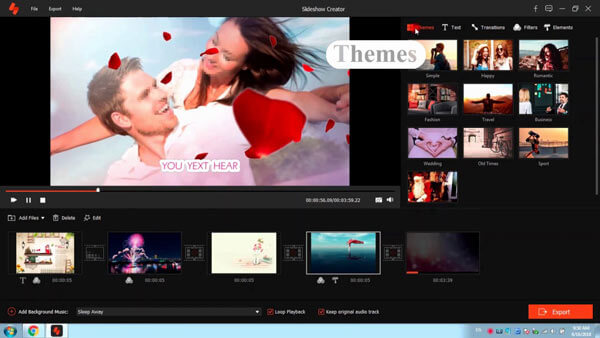
Best for: Windows users who have a collection of photos and want a professional slideshow video with music, effects and full control over the output format.
If you hold a collection of amazing photos/pictures on your computer, and want to add music to pictures to make them enjoyable, you can consider making a music photo slideshow. This needs you to find a slideshow maker first. Here I strongly recommend you the best SlideShow Maker to make slideshow with music/photo/video and edit videos effects freely. With this program, you can add all popular music files to images/photos, including MP3, AAC, M4A, OGG, WMA, WAV, FLAC, and more. Then, you can see your favorite image when playing the songs by any media player. Now free download this powerful slideshow maker and see how it works.
Downloads
 100%
Secure. No Ads.
100%
Secure. No Ads.
100%
Secure. No Ads.
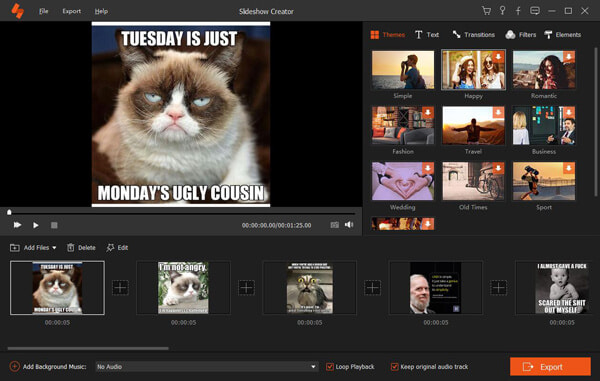

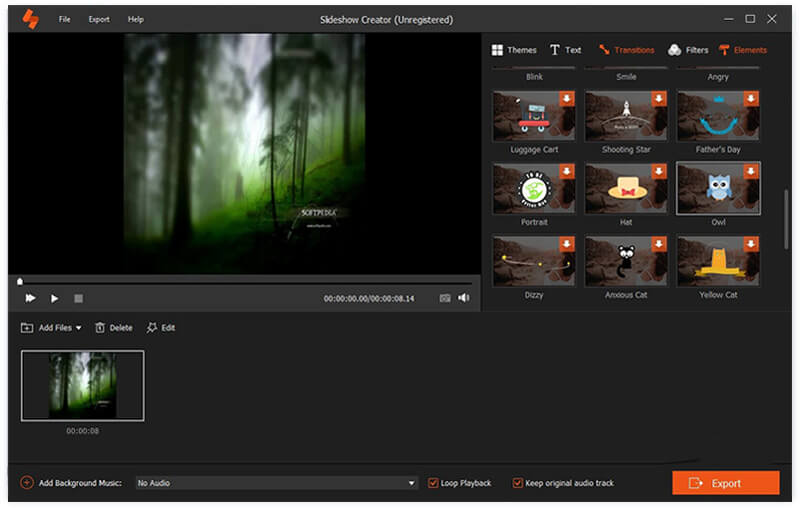
Here's the video about making slideshows for you. Click it to check.

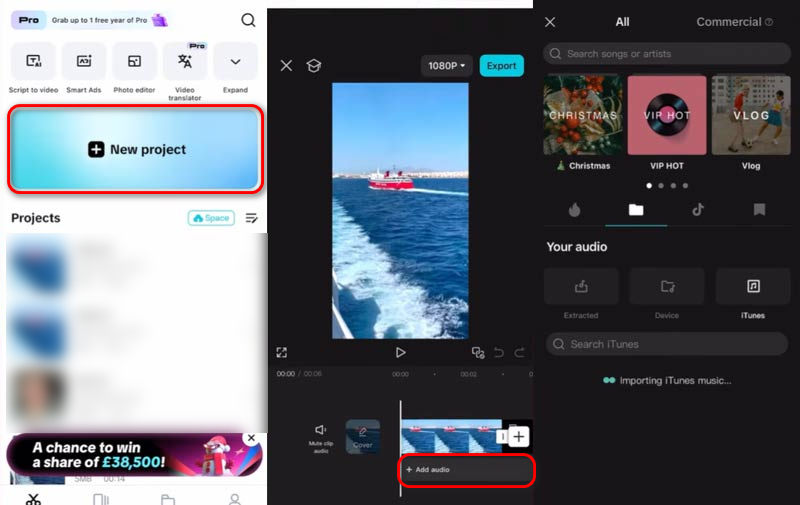
Best For: mobile users who want to create photo videos with music quickly and share them straight to social media - free on both iPhone and Android.
More and more people shoot photos on their iPhone, so you may wonder how to add audio to iPhone photos. The most popular way is a free mobile editor like CapCut.
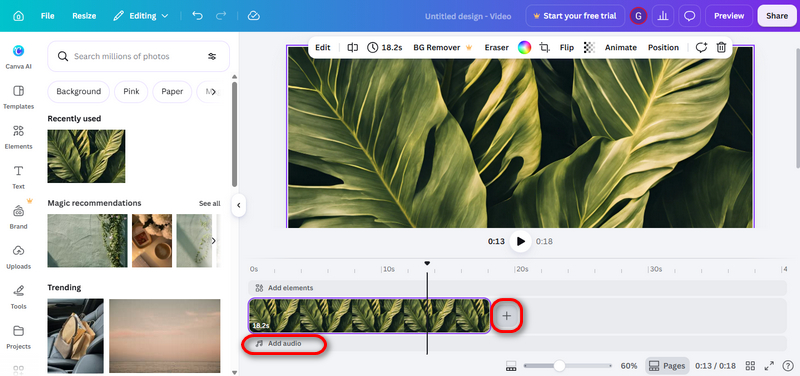
Best For: users who do not want to install any software - everything runs in the browser, free and cross-platform.
If you prefer not to install anything, online editors are the fastest route. Canva lets you upload photos, add music or narration, and export a video slideshow - all in your browser.
Can I add music to a photo for free?
Yes. CapCut is free mobile apps, Canva offers free browser plans. Aiseesoft Slideshow Maker offers a free trial for quick projects.
Can I add audio to a JPG file?
Not directly - the JPG format has no audio track. What you can do is combine the JPG and an audio file into a video file (MP4), which is exactly what all 3 methods above do.
Conclusion
Adding audio to a photo is easier than ever. For a polished slideshow on Windows, use Aiseesoft Slideshow Maker; on your phone, CapCut gets the job done in minutes; in the browser, Canva needs no installation. Whatever your device and skill level, one of these methods will make your pictures sound as good as they look.
 Top 5 Free Video Enhancer to Improve Video Quality
This page lists the review of top 5 best and free video enhancer software/app/APK, so that you can increase video quality on computer/mobile phone or online easily.
 Top 10 Best Text Message Readers for Android/iPhone - Listen & Reply My Text Messages Hands-Free
Want to listen and reply to text messages on Android/iPhone while driving? This article gives you 10 best apps that enable you read text messages hand free.
 How to Transcribe Audio to Text with Best Audio to Text Converter
How to transcribe audio to text? This article introduces the best method to help you convert audio to text.
Slideshow Maker
Slideshow Software Slideshow Maker Slideshow App Make Slideshow with Music Slideshow with Music Slideshow Songs Add Music to Slideshow Add Audio to Photos Add Music to Pictures Make Video with Music & Pictures Make YouTube Video with Photo & Music
Slideshow Creator is the best movie maker and video editor. Designed with various video/photo/music editing functions, you can adjust the visual effects easily.
100% Secure. No Ads.

*Required field
*Please enter a valid email
