Shrink Video File Size with High Quality

Effortlessly compress videos without losing the original clarity. Our advanced compression tech preserves almost all details while slashing storage by up to 80%. Besides, it offers real-time preview and flexible output formats, like MP4, MKV, WEBM, and MOV. Perfect for fast sharing and saving disk space without quality compromise!


Customize Video File Compression

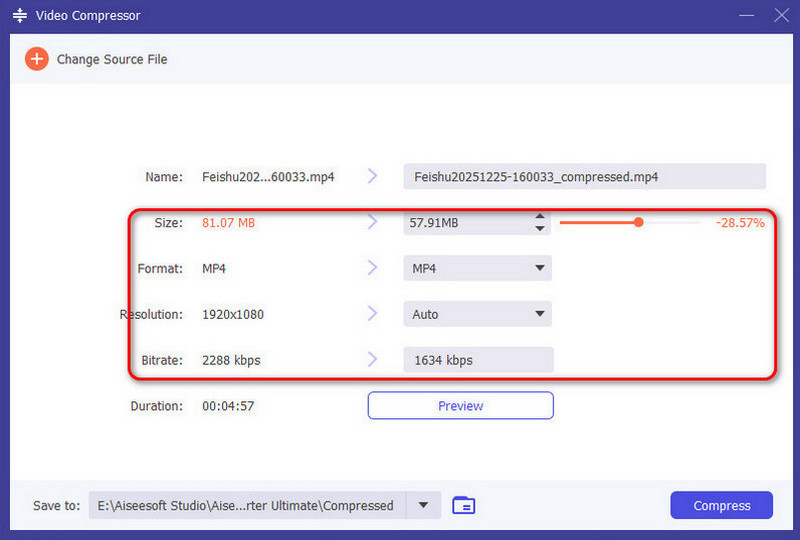
Take full control of your exports with our video size compressor. Make good use of the built-in interactive slide and varying numbers to preview file compression sizes in real-time. Besides, you can manually adjust format, resolution, and bitrate to achieve your target size. Convenient for tailoring videos to fulfill any platform’s requirements!

Reduce Video Size Seamlessly

With Aiseesoft Video Compressor, you can compress videos instantly with a clean and easy-to-use interface. No learning curve needed - just three simple steps to shrink video file size. As a result, you will acquire more storage space and speed up video sharing without quality loss. Incredibly user-friendly for everyone!

Buy Now50% OFF

30-Day Money Back Guarantee

Free Download

Windows 11, 10, 8, 7 Supported

Buy Now50% OFF

30-Day Money Back Guarantee

Free Download

macOS 10.12 or later

More Supports to Compress Your Video File

Various Formats

Unlimited input format and 16 popular output formats - MP4, MKV, MOV, etc.

One-click Preview Option

Before compressing videos, you can preview the video compression effect.

Multiple Compression

For a smaller size, we support compressing video file repeatedly and multiple times.

Buy Now50% OFF

30-Day Money Back Guarantee

Free Download

Windows 11, 10, 8, 7 Supported

Buy Now50% OFF

30-Day Money Back Guarantee

Free Download

macOS 10.12 or later

When We Need a Video Compressor?

Social Media Sharing

Social Media Sharing

Social platforms such as YouTube/TikTok/Instagram restrict file size. So, when uploading video files, reducing the video size is necessary.

Transfer Video Files

Transfer Video Files

File compression can resolve the "File too large" error, and help you transfer videos to family and friends more quickly.

Save Storage Space

Save Storage Space

Video files taking up too much storage? Use this video size reducer to instantly free up to 80% more space across all your devices.

Buy Now50% OFF

30-Day Money Back Guarantee

Free Download

Windows 11, 10, 8, 7 Supported

Buy Now50% OFF

30-Day Money Back Guarantee

Free Download

macOS 10.12 or later

How to Use Aiseesoft Video Compressor to Reduce the Video Size

There are only 3 steps to shrink your video file size. Convenient and efficient!

Step 1

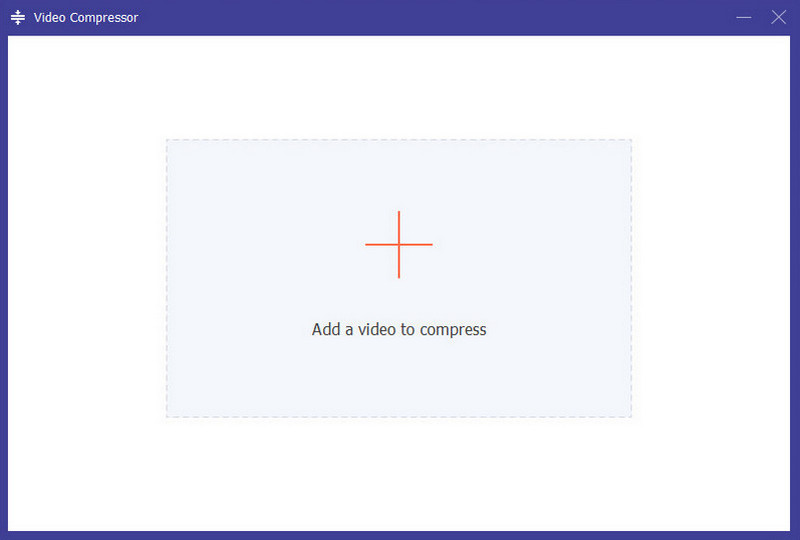
Add video

First, open Aiseesoft Video Compressor, and add the video that you want to compress.

Step 2

Set Parameters

Next, adjust the video file size, format, resolution, and bitrate as needed.

Step 3

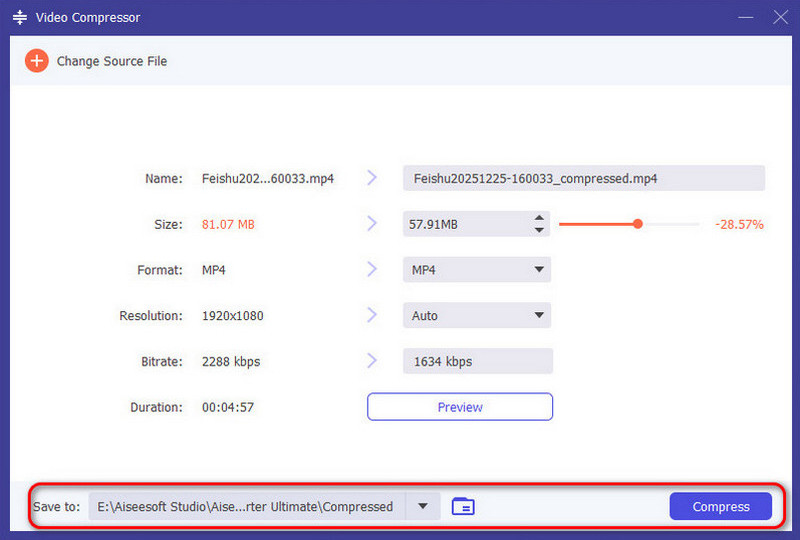
Start Compression

Finally, choose the location and click the blue Compress button to start video compression.

Add Video To Compressor
Set Parameters
Start Compression

More Solutions You May Need

Aiseesoft Video Compressor - Reduce Your Video Size Now

More amazing features in Aiseesoft Video Converter Ultimate!

Buy Now50% OFF

30-Day Money Back Guarantee

Free Download

Windows 11, 10, 8, 7 Supported

Buy Now50% OFF

30-Day Money Back Guarantee

Free Download

macOS 10.12 or later