
Video Converter Ultimate
 100% Secure. No Ads.
100% Secure. No Ads.
LALAL.AI is a famous vocal remover that offers fast audio stem separation services. It allows you to extract or isolate various tracks, such as vocals, accompaniments, and instruments, from any audio and video file directly on your web browser. LALAL.AI claims to be the next-generation vocal remover that adopts the world’s #1 AI technology. However, when it comes to online tools, you may still have some concerns.
Is LALAL.AI vocal remover worth it? Does it truly deliver the highest quality?
This LALAL.AI review dives deep into this popular AI vocal remover and instrumental splitter, telling its key features, comparing it with a top competitor, and scrutinizing its pricing to help you make your decision wisely.
How We Test & Review
LALAL.AI is more than just a vocal remover; it offers other commonly used stem isolation functions. Moreover, it utilizes world-class neural networks to guarantee the best result. Its AI can accurately identify and extract different instruments.
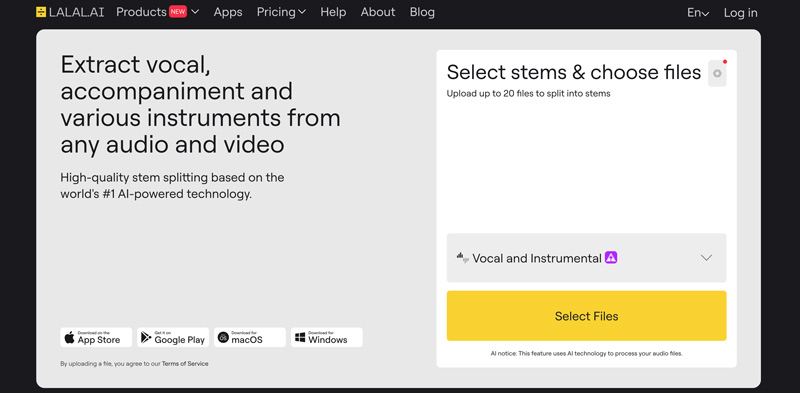
1. The core feature is the AI-powered audio source separation. It allows users to effortlessly isolate vocals and instruments from any audio or video file.
2. Its significant advantage is the promise of high-quality, lossless stem extraction. It claims that it won’t leave typical artifacts like metallic echoes or muffled sounds.
3. As mentioned, besides vocals, it can separate other distinct stems, such as drums, bass, guitar, piano, synthesizer, wind instruments, and more.
4. The online music source separation service also has a Voice Cleaner for removing unwanted background noises, including echo, background hum, and reverb from dialogue/vocal tracks.
LALAL.AI offers a free trial to access and test its vocal removal, stem splitting, and other functions. However, the free “Starter” plan does not allow you to download results. You must purchase credits to download full files. That makes LALAL.AI a useless tool for most users.
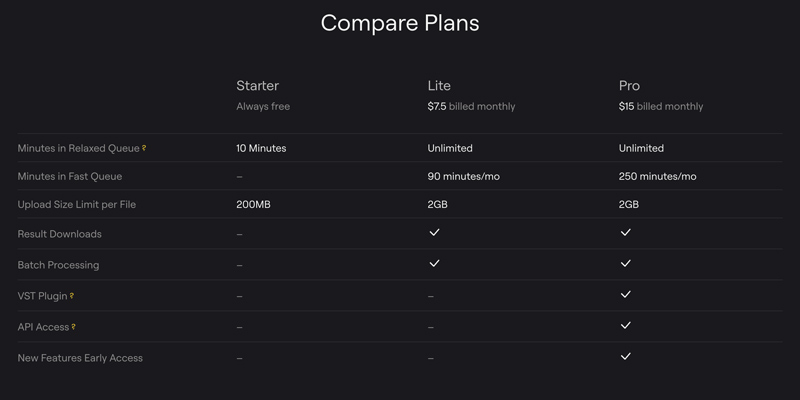
Generally, you should start a trial of LALAL.AI, test its vocal removal capabilities with your own files, and then make the decision if you are happy with it and willing to upgrade to a paid plan. This section explains the main strengths and weaknesses.
PROS
PROS
The Verdict:
If you really like its vocal removal results and often deal with related audio track separation or extraction tasks, you can select a desired plan to buy LALAL.AI. However, if you are just a casual user or prefer a more advanced tool, you should try other AI vocal removers first, especially considering that there are many competitors.
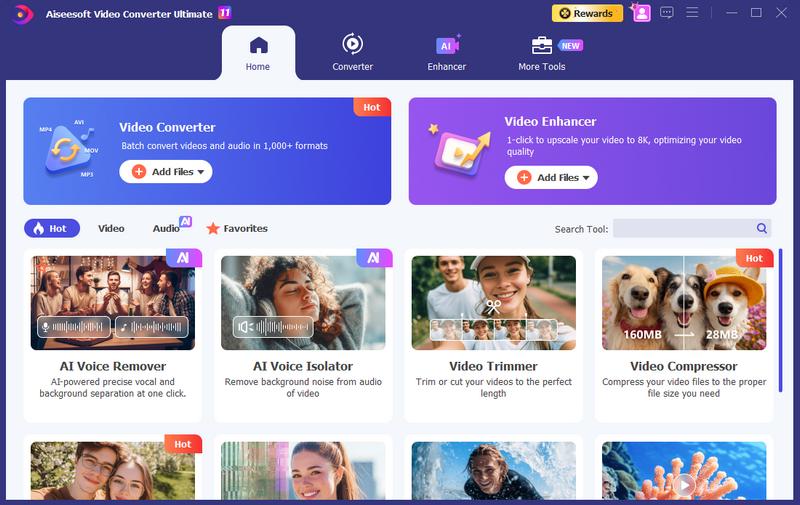
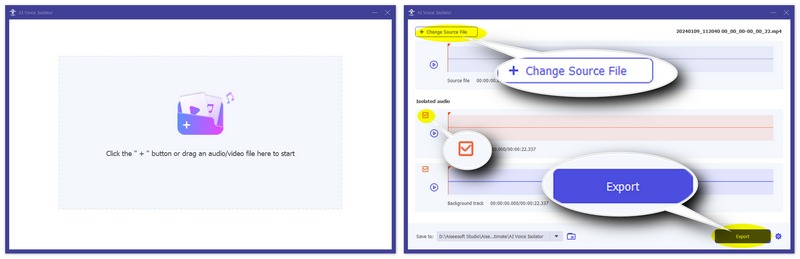
If you are unsatisfied with LALAL.AI’s “buying minutes” strategy, or prefer to try some other AI vocal removal tools, we highly recommend Aiseesoft Video Converter Ultimate. It is more than a converter; multiple powerful tools are designed in it, including a built-in AI Voice Remover.
100% Secure. No Ads.
100% Secure. No Ads.
Unlike LALAL.AI, Aiseesoft AI vocal remover runs locally on your computer. You don’t need a network connection or upload your file to a cloud server. That guarantees your privacy. What’s more, it sets no limits to your files and processing minutes.
Compared to LALAL.AI, it uses more advanced AI models to better handle complex tasks. Besides, it allows you to directly edit and enhance your separated audio with ease.
Question 1. Can I use LALAL.AI for free?
Yes, there is a free “Starter” plan for you to process up to 10 minutes of audio for free. However, you cannot download the results. What’s worse, there are other feature limits. You must upgrade to break these limits and get a faster processing speed.
Question 2. Can LALAL.AI remove reverb?
Yes, as mentioned above, LALAL.AI has an individual Voice Cleaner tool and De-reverb settings for users to remove reverb. They are specifically designed to clean live recordings with reverb. You can click here to get more vocal removers for different platforms.
Question 3. Is LALAL.AI the highest quality vocal remover?
No. Even though LALAL.AI often delivers high-quality stem separation results, many competitors can produce similar or even higher-quality audio. As a web-based vocal remover, LALAL.AI is considered to be among the highest quality.
Conclusion
LALAL.AI Vocal Remover remains a popular choice for casual users who want a quick way to remove vocals from a song directly on a web browser. However, its free version does not allow you to download results. That can be a big drawback for many users. You can check the review and compare its pros & cons to make an informed decision before purchasing a paid plan.
 How to Remove Echo from Audio Using 5 Helpful Editor Tools
Why is my audio output echoing? How do you clean up echo in audio and fix echoey audio? What AI can get rid of echo in audio? Learn 5 ways to remove audio echo.
 How to Mute Videos and Remove Audio Tracks from Videos
How can I mute videos on Instagram on my iPhone? How do you silence videos on TikTok? This post shares five apps to remove audio from your videos and mute them.
 Best AI Audio Fixers in 2026: Restore Clarity Instantly
Here are the most efficient AI audio fixing tools to repair poor audio, remove background noise, and enhance vocal clarity for professional or personal projects.
About AMV
1.1 Best AMV Maker Apps 1.2 How to Make AMV on Computer 1.3 How to Make AMV on iPhone/iPad 1.4 How to use Windows Movie Maker 1.5 AMV - What Is AMV 1.6 Best AMV Editor Apps 1.7 Top 5 AMV Converters
Video Converter Ultimate is excellent video converter, editor and enhancer to convert, enhance and edit videos and music in 1000 formats and more.
100% Secure. No Ads.
100% Secure. No Ads.

*Required field
*Please enter a valid email

