Contents
There's nothing more frustrating than the connection to the server failed just when you are in a hurry to send an important mail.
For iPhone users who use the built-in Mail app, they may get a common error message that displays, "Cannot Get Mail. The connection to the server failed" or "The mail server 'imap.gmail.com' is not responding", especially from Microsoft Exchange and Yahoo mail.
The issue of connection to server failed happens to all iOS devices running on iOS 18/17/16/15/14/13/9/8/7.
So what is the best way to fix iPhone cannot get mail? In this article, we have provided 6 methods to fix this "Cannot get mail connection to server failed" issue, hope they can help you.
Quick Check Box
1. Check the Internet Connection
2. Move Mails to Different Inboxes
3. Turn on and off airplane mode
4. Restart the Mail app
Excessive network caching or synchronization days may result in high server performance. Therefore, we can eliminate interference terms at the system layer and reduce synchronization load.
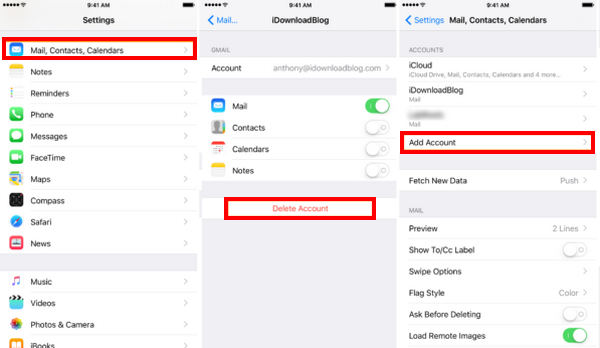
Email protocols (such as IMAP/SMTP) use Token or Session for authentication. If the security policy is changed on the server-side, the password expires, or the client's authorization credentials become invalid, the connection will be denied. Therefore, we need to log in to our account again.
After you log into your email account, it should refresh your mail messages. Check the problem again.
Don't Miss: 10 Best Email Apps for iOS to Help You Manage Your Daily Email
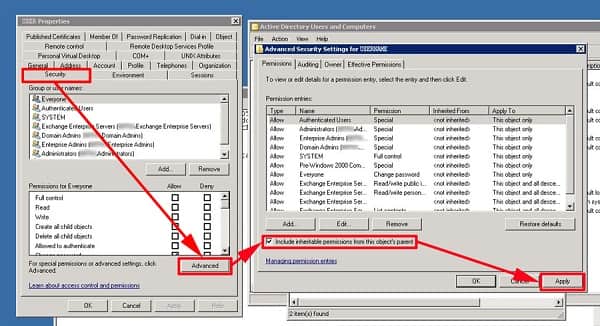
For enterprise-level Exchange accounts. There is a permission inheritance mechanism in Active Directory (AD). If the user's mobile device access permission is restricted, or if 'including permissions inheritable from the parent of the object' is not checked, the server will reject the connection request from the mobile end. So changing Microsoft Exchange security settings can solve this problem.
If the none of all the solutions work, then your iOS system may get errors. For fixing it, you should repair the iOS system. Whether your Email service is from iCloud, Outlook, Gmail, etc., you can use this tool to fix the server failed connection issue.
Aiseesoft iOS System Recovery is the professional iOS system fix software without any skills.
The iOS system repair software can fix various system issues like Apple logo, white screen, loop restart, DFU mode, iTunes Recovery mode, etc.
Its quick fix feature can free repair your iOS system for disabled iPhone, iPad and iPod.
With it, you can easily fix the problem of not getting Email caused by the iOS system issue.
188,699Downloads
 100% Secure. No Ads.
100% Secure. No Ads.
Free download Aiseesoft iOS System Recovery on your computer by clicking the following download link. Install it and launch this software on your computer.
In the main interface, choose iOS System Recovery.
Plug your iPhone into computer with the USB cable. Do not forget to unlock iPhone and tap Trust on iPhone.
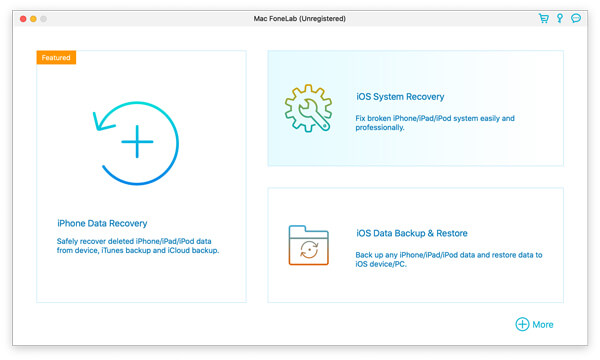
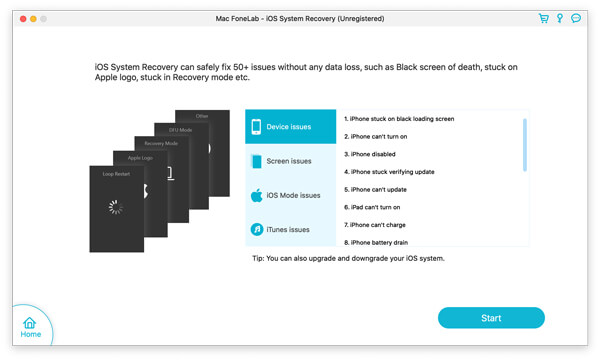
Here, you will see various issues that this software can fix. Then click Start to proceed.
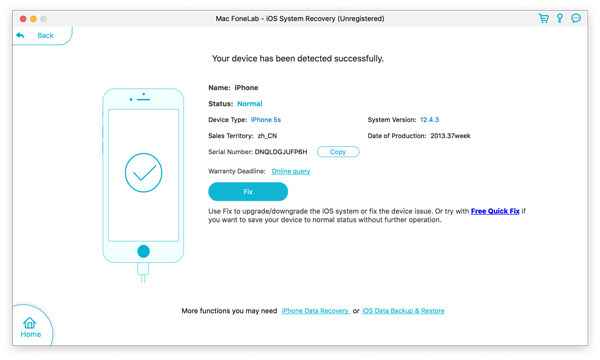
Here, there are 3 options left for you.
1. If your iPhone system is abnormal, this software will detect it automatically. Otherwise, the status will mark as Normal.
If your iOS device is in Normal, you can click Free Quick Fix, and this software will repair your iPhone automatically.
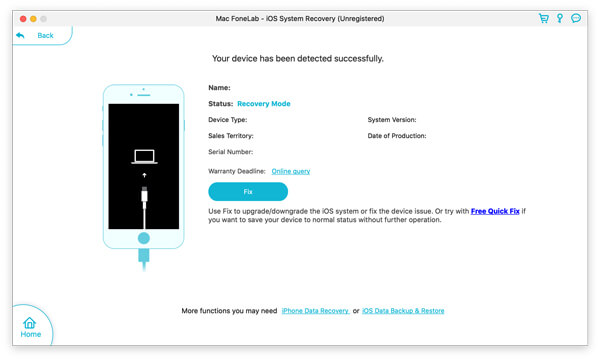
2. If your iPhone status is detected as DFU Mode or Recovery Mode, you should click Fix to continue.
3. If your iPhone is detected abnormal and show the status Unknown, you also should click Fix to continue.
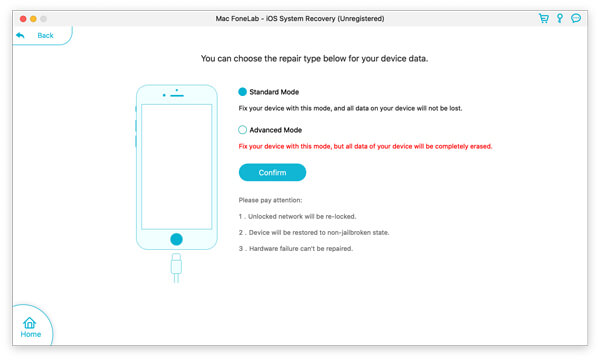
In the pop-up window, you should select the repair mode from Standard Mode or Advanced Mode.
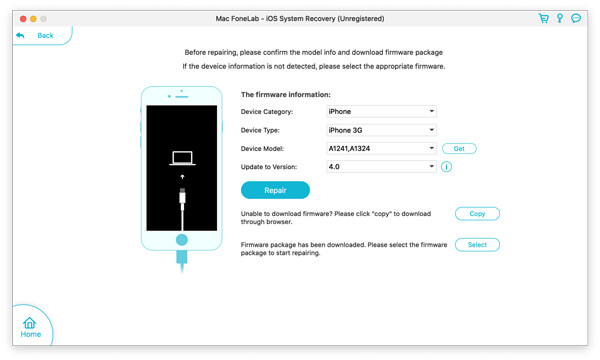
Here you will need to select the firmware information (Device Category, Device Type, Device Model and Update to Version) before repairing it. Here you can downgrade iOS or download the latest iOS beta version.
Then click Repair to start fixing your iOS system.
After that, you can check the email to see if you can get the emails.
Why can I receive but not send emails?
If you can receive emails but can't send emails, that may be the outgoing (SMTP) server is not configured. If you can't send or receive emails, perhaps your IP address has been banned.
What can I do if my Yahoo mail not working?
There are many reasons that cause Yahoo mail not working. For example, Yahoo Mail has not released an update for iPhone update. Yahoo Mail is stuck and could not open. The outdated login information can also change Yahoo mail not working.
What is SMTP server for email?
An SMTP (Simple Mail Transfer Protocol) server is an application that designed to send, receive, or relay outgoing mail between email senders and receivers.
Conclusion
These are all the solutions we have offered to solve the problem of iPhone cannot get mail the connection to the server failed. All the methods are easy to follow and it is up to you to choose which method you need. After all solutions, iPhone/iPad/iPod touch cannot get mail still? Leave your problems below and I'll see what I can do ASAP!
 7 Solutions to Fix iCloud Sign-In Keeps Popping up for Password
iCloud sign-in keeps popping up for asking for password? Read this post and learn from 7 solutions to fix repeated iCloud sign-in requests in details.
 My iPhone Screen is Black? Here is The Fix
Run into iPhone 5/6/7/8/X/XS/XR/11/12 black screen or won't turn on? Check this post and learn why iPhone screen went black and how to fix iPhone black screen.
 [Fixed] Why is My iPhone Hot? Fix iPhone Overheating Problem.
Got an iPhone 11/x/8/7/6 but the iPhone overheating issue keeps haunting you? Learn to fix iPhone 11/x/8/7/6 overheating and iPhone battery draining fast in this post. It is very useful.
 Leave your comment and join our discussion
Apple Products Usage
Fix your iOS system to normal in various issues like being stuck in DFU mode, recovery mode, headphone mode, Apple logo, etc. to normal without any data loss.
100% Secure. No Ads.
100% Secure. No Ads.

*Required field
*Please enter a valid email

