
Operation: Professional
Best for: Professional editors, colorists, and filmmakers who want Hollywood-grade editing, color grading, VFX, and audio post-production - for free.
Video Converter Ultimate
 100% Secure. No Ads.
100% Secure. No Ads.
Video editing has never been more accessible. Whether you are crafting a YouTube vlog, a social media reel, a family montage, or a professional short film, the right free video editor can make all the difference. You do not need to spend hundreds of dollars on premium software - Windows 11 and Windows 10 users have access to a wide range of powerful, no-cost video editing tools, from beginner-friendly apps to Hollywood-grade professional suites.
But with so many options available, how do you choose the best free video editing software for your Windows PC? In this updated guide, we rank the top free video editors for Windows 11 and 10, covering everything from one-click easy editors to advanced ones.
How We Test & Review
All our reviews and selections are conducted by human editors who evaluate each video editor from a real user's perspective.
Our testing process includes installing each application on Windows 11 and Windows 10 test machines (including both low-end and high-end hardware configurations), importing a standardized set of test clips (1080p and 4K, MP4 and MOV formats with mixed audio), performing core editing tasks (trimming, adding transitions, applying effects, overlaying text, and exporting), and measuring export time and output quality. We also evaluate the user interface, learning curve, available documentation and community support, and whether the free tier imposes watermarks or export restrictions.
| Product | Price | Difficulty | Max Resolution | Best For | Key Pros & Cons |
| DaVinci Resolve | Free Studio $295 | Professional | 8K (free) | Pro editors, colorists, filmmakers | + Hollywood‑grade color grading, Fusion VFX, Fairlight audio, multi‑cam, no watermark − Steep learning curve, heavy system requirements |
| CapCut | Freemium Pro: $7.99/month | Easy | 4K | Beginners, social media, YouTubers | + Intuitive UI, auto‑captions, templates, royalty‑free music, no watermark on standard exports − Some premium effects require subscription, mobile‑first design |
| Clipchamp | Freemium Essentials: $11.99/month | Easy | 1080p (free) | Windows 11 users, quick social videos | + Pre‑installed on Windows 11, drag‑and‑drop, AI tools, OneDrive integration − Free tier limited to 1080p, some stock assets paid, browser‑based feel |
| VSDC Free Video Editor | Free Pro: $19.99 | Easy | 4K | Feature‑rich non‑linear editing, no watermark | + Chroma key, masking, blending modes, screen recorder, wide format support, no watermark − Interface slightly clunky, no hardware acceleration in free version |
| Shotcut | Free & Open‑source | Easy | 4K | Open‑source, cross‑platform, no hidden costs | + Completely free & open‑source, native format support, customizable UI, video scopes, no watermark/ads − Effects library smaller than commercial editors, occasional stability quirks |
| Lightworks | Freemium Pro: $24.99/month | Professional | 1080p (free) | Aspiring pro editors, industry‑standard NLE | + Academy Award‑winning NLE, real‑time effects, multi‑cam, robust timeline − Free version capped at 1080p, unique keyboard‑driven workflow, export format restrictions |
| OpenShot | Free & Open‑source | Easy | 4K | Total beginners, simple drag‑and‑drop editing | + Very easy to learn, unlimited tracks, 400+ transitions, 3D titles (Blender), cross‑platform − Lacks advanced features, can be slow on large projects, limited audio tools |
| VideoPad Video Editor | Freemium Pro: $34.99 | Easy | 4K (paid) | Home users, direct YouTube/social sharing | + Dual timeline (storyboard + timeline), 50+ effects, chroma key, direct social upload, lightweight − Free version for non‑commercial only, 4K locked in paid, interface feels dated |
| Avidemux | Free Open‑source | Easy | Source‑dependent | Quick cutting, filtering, format conversion | + Ultra‑lightweight & fast, no re‑encoding for some cuts, supports AVI/MP4/MKV/ASF, completely free − Not a full NLE (no multi‑track timeline), no effects/transitions, minimal UI |
| Aiseesoft Video Converter Ultimate | Freemium Pro: $14.50/month | Easy | 4K / 8K input | All‑in‑one conversion, editing & enhancement | + 1000+ formats, clipping/merging/cropping/subtitles, video enhancement (upscale/denoise), compression, GIF maker, built‑in player − Free trial has conversion limits, not a full multi‑track NLE |
Below are our hand-picked top 10 free video editing software for Windows PC, ranked by a balance of features, ease of use, performance, and output quality. Each entry includes its difficulty level, best-use scenario, key features, and system compatibility.
Score:4.9/5
Operation: Professional
Best for: Professional editors, colorists, and filmmakers who want Hollywood-grade editing, color grading, VFX, and audio post-production - for free.
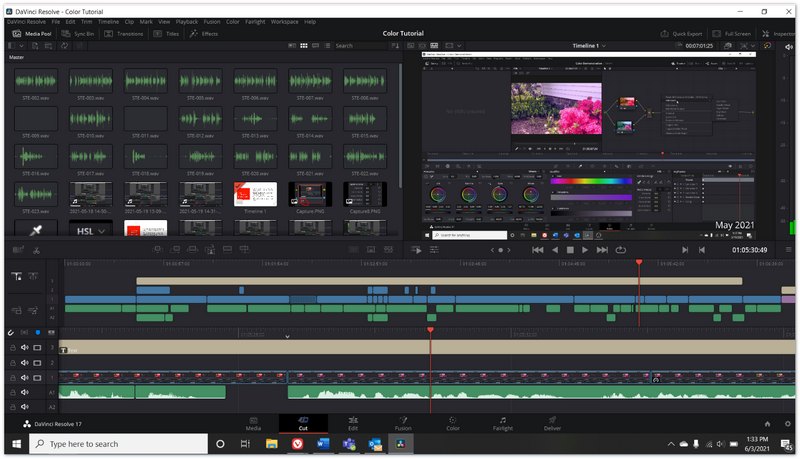
DaVinci Resolve is widely regarded as the most powerful free video editor for Windows. It combines professional non-linear editing, advanced color grading, visual effects (Fusion), motion graphics, and Fairlight audio post-production in a single application. Used on Hollywood feature films and television shows, it supports resolutions up to 8K and offers multi-cam editing, 3D audio, and a massive library of effects and transitions. The free version includes nearly all the features of the paid Studio version, with only a few high-end features (such as 120fps+ at 4K, certain neural engine effects, and stereoscopic 3D) locked behind the paid upgrade.
DaVinci Resolve is compatible with Windows 11 and Windows 10 (64-bit), macOS, and Linux.
Score:4.7/5
Operation: Easy
Best for: Beginners, social media creators, and YouTubers who want a fast, intuitive editor with built-in templates, effects, auto-captions, and trending music.
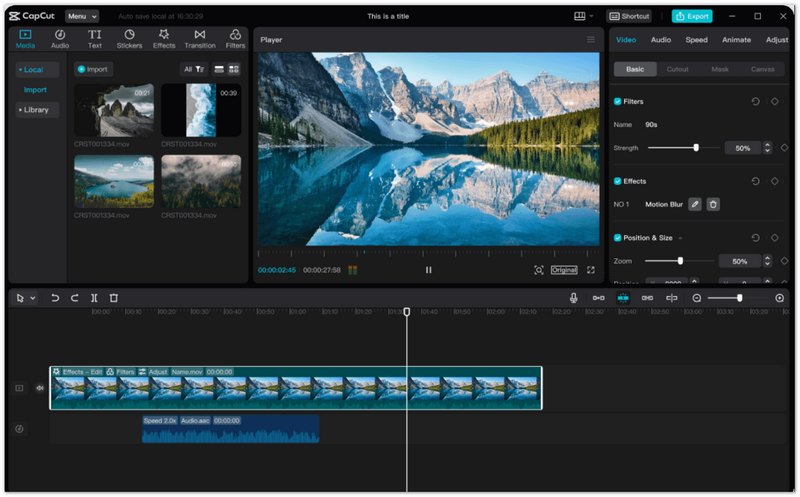
CapCut has rapidly become one of the most popular free video editors for Windows, thanks to its remarkably clean and intuitive interface. It offers a full timeline with multi-track editing, a huge library of built-in effects, transitions, filters, stickers, and text animations. Standout features include auto-generated captions, text-to-speech, background removal, speed curves, and a vast royalty-free music library. The desktop app for Windows syncs with your CapCut mobile account, and most features are completely free with no watermark on standard exports. A optional Pro subscription unlocks premium templates and stock assets.
CapCut is compatible with Windows 11 and Windows 10 (64-bit), macOS, iOS, and Android.
Score:4.3/5
Operation: Easy
Best for: Windows 11 users who want a pre-installed, browser-integrated video editor with ready-made templates for quick social media and marketing videos.
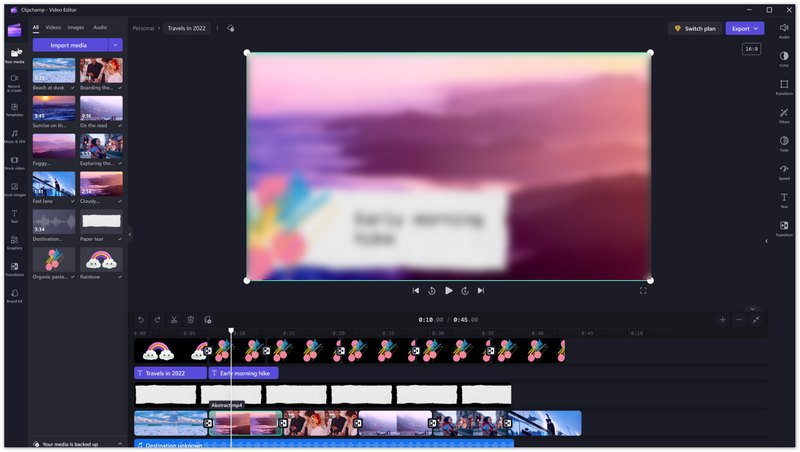
Clipchamp is Microsoft's own free video editor, and it comes pre-installed on Windows 11 (also available as a web app and for Windows 10). It features a straightforward drag-and-drop timeline, AI-powered tools such as auto-captioning and text-to-speech, and a large collection of templates for social media, presentations, and marketing. The free tier allows unlimited exports at up to 1080p with no watermark on your own content, though some premium stock footage and templates require a paid subscription. Its deep integration with Windows and OneDrive makes it a convenient choice for users already in the Microsoft ecosystem.
Clipchamp is pre-installed on Windows 11 and available for Windows 10 via web browser.
Score:4.5/5
Operation: Easy
Best for: Windows users who want a feature-rich, non-linear free video editor with no watermark, chroma key, masking, and 4K export — without the steep learning curve of professional software.
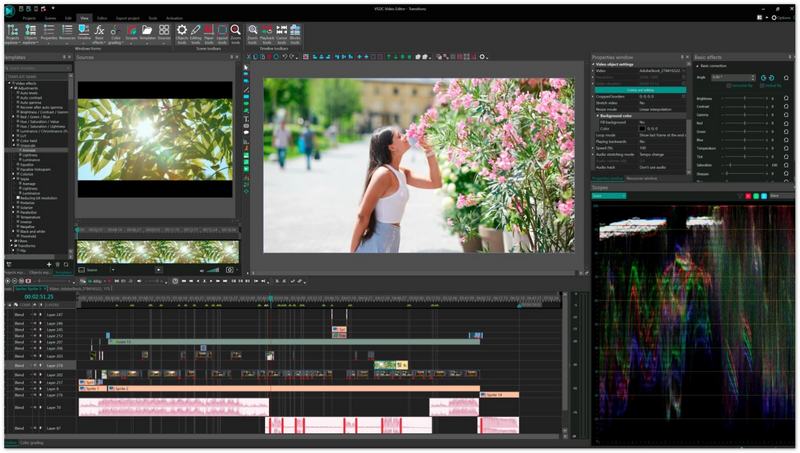
VSDC Free Video Editor is a popular non-linear video editing software for Windows that offers an impressive set of features at no cost. It supports virtually all popular video and audio formats, offers chroma key (green screen) effects, video masking, color correction, blending modes, and a built-in screen recorder. It can export videos in up to 4K resolution and includes a wide range of transitions, filters, and special effects. Unlike many free editors, VSDC does not add a watermark to exported videos. The interface is slightly more complex than CapCut or Clipchamp, but it rewards users with greater creative control. A paid Pro version adds hardware acceleration, advanced masking tools, and priority support.
VSDC Free Video Editor is compatible with Windows 11, 10, 8, and 7.
Score:4.4/5
Operation: Easy
Best for: Users who want a free, open-source, cross-platform video editor with a clean interface, broad format support, and no watermarks or hidden costs.
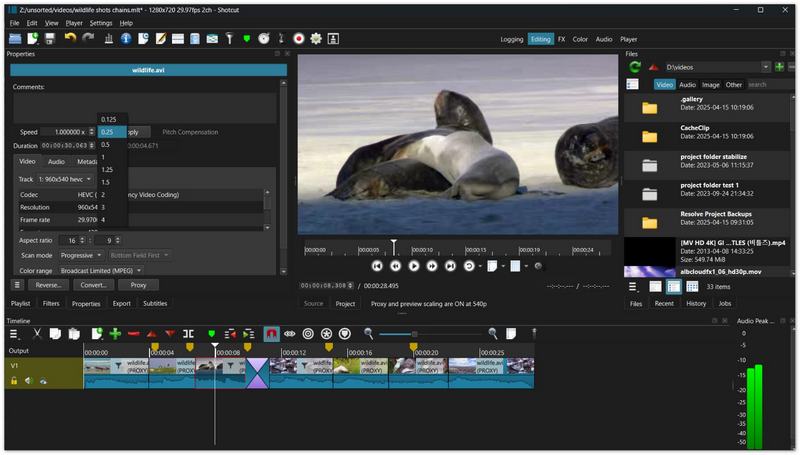
Shotcut is a free, open-source, cross-platform video editor that has grown in popularity thanks to its active development community and straightforward design. It supports a huge number of video and audio formats natively (no transcoding required), offers 4K editing, multi-format timelines, and a good selection of filters and transitions including color grading, audio mixing, and video scopes. Its interface is customizable and relatively easy for beginners to pick up, while still offering enough depth for more experienced users. Because it is open-source, Shotcut is completely free with no watermarks, no ads, and no paid upgrades — all features are available to everyone.
Shotcut is compatible with Windows 11, 10, 8, and 7 (64-bit), macOS, and Linux.
Score:4.2/5
Operation: Professional
Best for: Aspiring professional editors and filmmakers who want a industry-standard NLE with a free tier, multi-cam editing, and real-time effects.
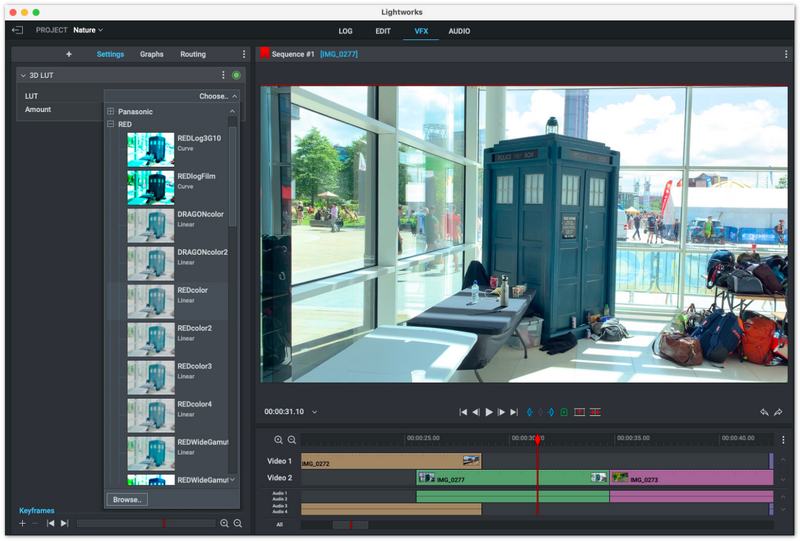
Lightworks is a professional non-linear editing (NLE) system that has been used in the film and television industry for decades — including on Academy Award-winning films. It offers a powerful timeline, real-time effects with built-in presets, multi-cam editing, and broad format support. The free version supports resolutions up to 1080p and includes most core editing features, making it a great way to learn professional editing workflows without paying for software. The paid Pro version unlocks 4K export, higher bit-depth, and additional output formats. Note that Lightworks has a unique keyboard-driven editing style that may take some time to learn for users coming from other editors.
Lightworks is compatible with Windows 11, 10, 8, and 7, macOS, and Linux.
Score:4.0/5
Operation: Easy
Best for: Beginners and casual users who want a simple, free, open-source video editor with an intuitive drag-and-drop interface and basic effects.
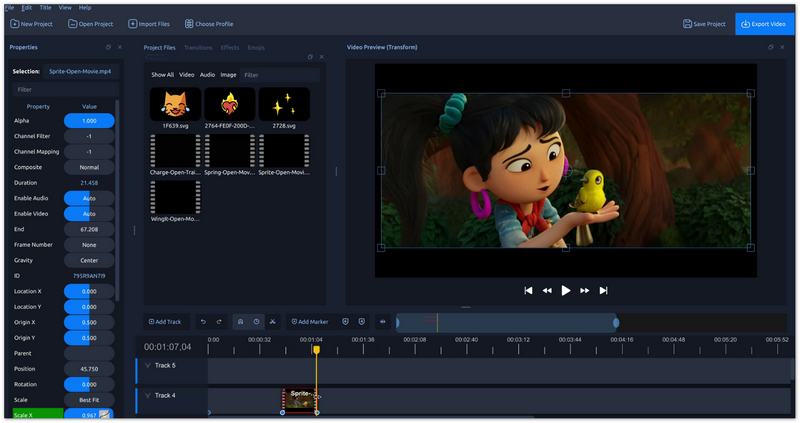
OpenShot is a free, open-source video editor designed to be simple and accessible for beginners while still offering a solid set of features. It provides an easy-to-use drag-and-drop timeline, unlimited tracks/layers, clip resizing, scaling, trimming, snapping, rotation, and cutting. It includes over 400 transitions, title templates, and effects, as well as basic keyframe animation and 3D animated titles (powered by Blender). OpenShot supports a wide range of video and audio formats and can export to many popular formats. While it may lack the advanced features of DaVinci Resolve or VSDC, it is an excellent choice for users who want to get started with video editing quickly and without cost.
OpenShot is compatible with Windows 11, 10, 8, and 7, macOS, and Linux.
Score:4.1/5
Operation: Easy
Best for: Home users and beginners who want a straightforward video editor with smooth transitions, basic effects, and direct sharing to YouTube and social platforms.
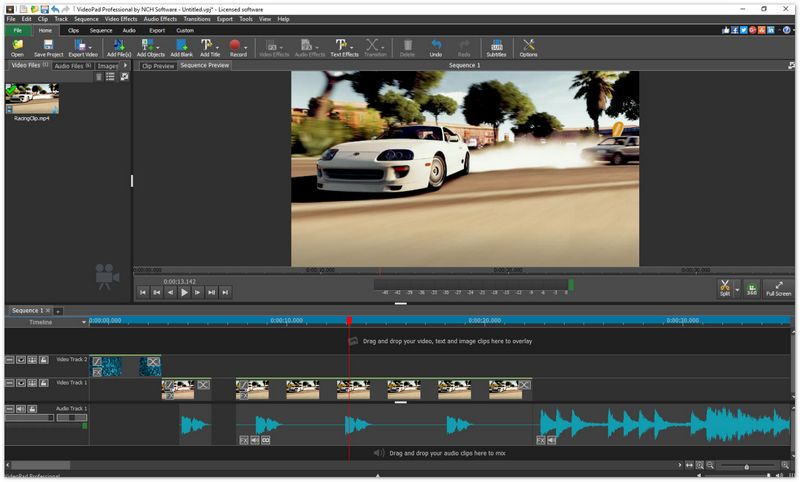
VideoPad Video Editor by NCH Software is a user-friendly video editing program that strikes a good balance between simplicity and functionality. It offers a dual timeline (storyboard and timeline views), over 50 visual effects and transitions, text overlays, chroma key, and audio tools including noise reduction and voiceover recording. It supports a wide range of input formats and can export to popular formats or directly upload to YouTube, Flickr, and Google Drive. The free version is available for non-commercial use and includes most core features. A paid Home Edition and Master's Edition add more effects, 4K support, and unlimited use for commercial projects.
VideoPad is compatible with Windows 11, 10, 8, 8.1, 7, Vista, and XP (64-bit), macOS, iOS, and Android.
Score:3.9/5
Operation: Easy
Best for: Users who need a lightweight, fast tool for simple cutting, filtering, and encoding tasks — especially for AVI, MP4, ASF, and MKV files — without the overhead of a full NLE.
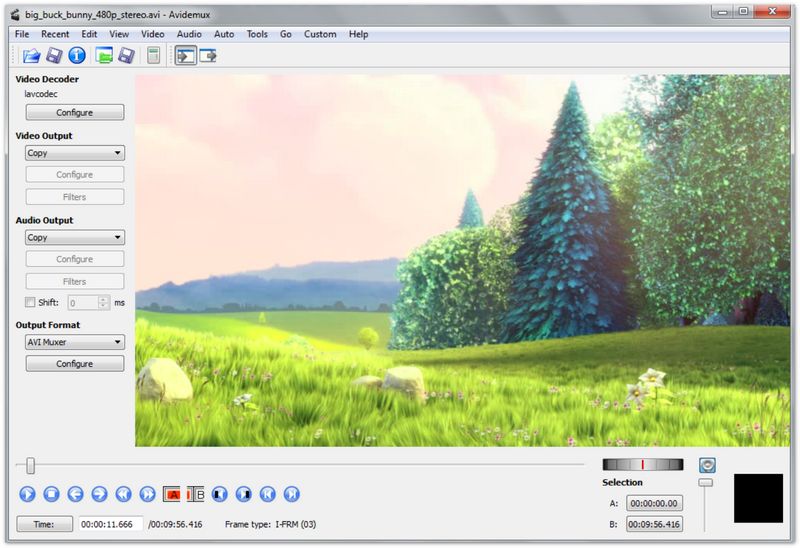
Avidemux is a free and open-source video editing program designed for simple cutting, filtering, and encoding tasks. It is not a full non-linear editor with multi-track timelines, but it excels at quick operations such as trimming clips, removing unwanted segments, applying filters (resizing, deinterlacing, denoising), and converting between formats. It supports a variety of codecs and containers including AVI, MP4, ASF, and MKV. Its interface is minimal and straightforward, making it ideal for users who need to perform fast, repetitive editing tasks without launching a heavyweight editor. Avidemux is completely free, open-source, and cross-platform with no watermarks or paid tiers.
Avidemux is available for Windows 11, 10, 8, and 7, macOS, Linux, and BSD under the GNU GPL license.
Score:4.9/5
Operation: Easy
Best for: Windows users who want an all-in-one video converter, editor, and enhancer that handles format conversion, basic editing, video compression, GIF making, and quality enhancement in a single lightweight tool.
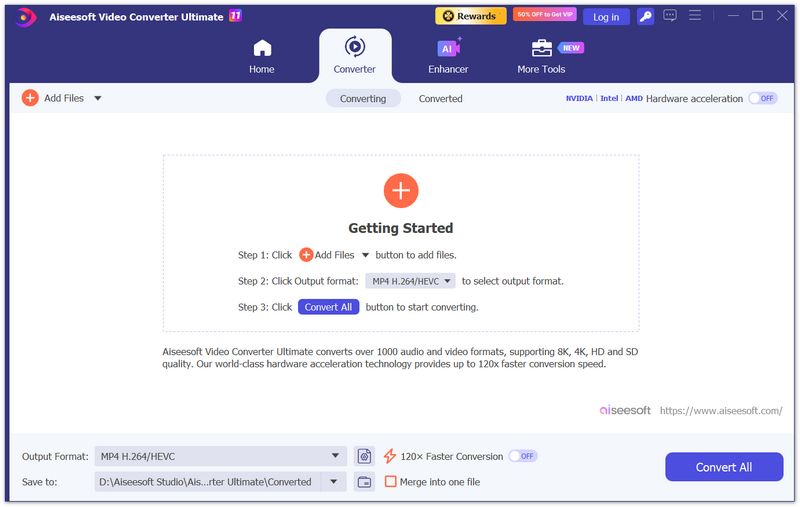
Aiseesoft Video Converter Ultimate is a powerful yet easy-to-use video processing suite for Windows. It supports converting videos and music in over 1000 formats, including MP4, AVI, MOV, WMV, MKV, MP3, FLAC, and more, with presets optimized for specific devices and platforms. Beyond conversion, it offers a full set of editing tools: clipping, merging, rotating, cropping, adding watermarks and subtitles, adjusting video effects (brightness, contrast, saturation, hue), and applying filters. It also includes video enhancement features such as upscaling resolution, optimizing brightness and contrast, removing video noise, and reducing shaking. Additional tools include video compression, 3D conversion, GIF creation, and a built-in media player. The interface is clean and intuitive, making it suitable for users of all skill levels.
Aiseesoft Video Converter Ultimate is compatible with Windows 11, 10, 8, and 7, as well as macOS.
100% Secure. No Ads.
100% Secure. No Ads.
What is the best free video editor for Windows 11?
The best free video editor for Windows 11 depends on your skill level. For beginners, CapCut and Clipchamp (built into Windows 11) are the easiest options. For professional-grade editing, DaVinci Resolve offers Hollywood-level color grading and effects for free. VSDC Free Video Editor and Shotcut are solid mid-range choices that balance features with ease of use.
Is there a completely free video editor with no watermark?
Yes. DaVinci Resolve, Shotcut, Kdenlive, Avidemux, and OpenShot are all completely free and open-source with no watermarks on export. VSDC Free Video Editor also exports without a watermark. CapCut's desktop version is free and watermark-free for most exports, though some premium effects require a subscription. Clipchamp's free tier adds a watermark only on certain premium stock assets.
Can free video editors handle 4K editing?
Yes. DaVinci Resolve supports up to 8K editing in its free version. VSDC Free Video Editor, Shotcut, and Kdenlive all support 4K video editing and export. CapCut also handles 4K on capable hardware. However, smooth 4K editing requires a powerful PC with sufficient RAM (16GB or more) and a dedicated GPU, regardless of which free editor you choose.
Which free video editor is best for beginners?
For total beginners, CapCut is the best free video editor for Windows thanks to its intuitive drag-and-drop interface, built-in templates, effects, and auto-captions. Clipchamp is another excellent beginner choice — it is pre-installed on Windows 11 and offers a simple timeline with ready-made templates. VSDC Free Video Editor is also beginner-friendly while offering more advanced features as you grow.
What is the best free alternative to Adobe Premiere Pro?
DaVinci Resolve is the best free alternative to Adobe Premiere Pro. It offers professional non-linear editing, advanced color grading, visual effects, motion graphics, and audio post-production — all in a single free application. It is used in Hollywood films and supports up to 8K resolution. Other capable free alternatives include Kdenlive (for a more Premiere-like timeline workflow) and Shotcut.
All our reviews and selections are conducted by human editors who evaluate each video editor from a real user's perspective.
Our testing process includes installing each application on Windows 11 and Windows 10 test machines (including both low-end and high-end hardware configurations), importing a standardized set of test clips (1080p and 4K, MP4 and MOV formats with mixed audio), performing core editing tasks (trimming, adding transitions, applying effects, overlaying text, and exporting), and measuring export time and output quality. We also evaluate the user interface, learning curve, available documentation and community support, and whether the free tier imposes watermarks or export restrictions.
Conclusion
By now, the top free and popular Windows video editors have been introduced in detail. The best video editor is the one that matches your skill level, hardware, and project needs — not necessarily the one with the most features. If you use Mac, you can jump to free Mac video editing software. For more advanced video processing including format conversion, noise reduction, and quality enhancement, check out Aiseesoft Video Converter Ultimate.
 5 Best HD Video Players for Windows 10/7/8/XP and Mac [Free Download]
What is the best HD video player? This post lists 5 best full HD video player apps (1080p/720p video player) to help you play media files on Windows 10/7/8/XP and Mac computer with great visual experience.
 6 Best 4K Video Players for Windows and Mac
What is the best 4K media player for Windows? Or do you need one for a Mac computer? Check the list of the 6 best 4K players for smooth playback.
 Using Windows Movie Maker to Edit Videos on PC for Free
How do you edit videos on Windows Movie Maker? This page is a full guide to use Windows Movie Maker to edit videos in details like cut, set transition, add video effects, and more.
 Leave your comment and join our discussion
Video Editor
1.1 Video Editing Software 1.2 Best Video Editing Software 1.3 Free Video Editor for Windows 1.4 Free Video Editor for Mac 1.5 Free Online Video Editor 1.6 Fast Forward Video Editor 1.7 Video Sound Editor 1.8 Best 4K Editor 1.9 AVS Video Editor 1.10 VSDC Free Video Editor 1.11 Blender Video Editing 1.12 iSkysoft Video Editor
Video Converter Ultimate is excellent video converter, editor and enhancer to convert, enhance and edit videos and music in 1000 formats and more.
100% Secure. No Ads.
100% Secure. No Ads.

*Required field
*Please enter a valid email
