Aiseesoft iPhone Unlocker
 100% Secure. No Ads.
100% Secure. No Ads.
If you've ever purchased a phone from a carrier or signed up for a contract, you might have heard the term SIM carrier lock or carrier lock. These locks can be frustrating if you want to switch to a new carrier or use your phone abroad. Don't worry, though! Carrier unlocking your smartphone is easier than you think. In this guide, we’ll walk you through everything you need to know about the SIM carrier unlock process on Android and iOS devices. We’ll check your phone’s status, look at the official ways to unlock carrier. Let's get your phone ready for anything!
Before you start the unlocking process, you’ll need to confirm if your phone is locked to a particular carrier. Here are a few ways you can check:
One of the simplest ways to check if your phone is locked is to insert a SIM card from a different carrier.
If the phone connects to the network (or lets you try to make a call) and doesn't display any warnings, you’re carrier unlocked!
If it displays a message like SIM card not valid, Network Lock, or Activation Required, then you have a carrier lock, and SIM locked how to unlock it is your next step.
Another way to check your phone’s carrier lock status is by navigating to your device’s settings. The process is slightly different depending on whether you’re using an Android phone or an iPhone:
• For Android:
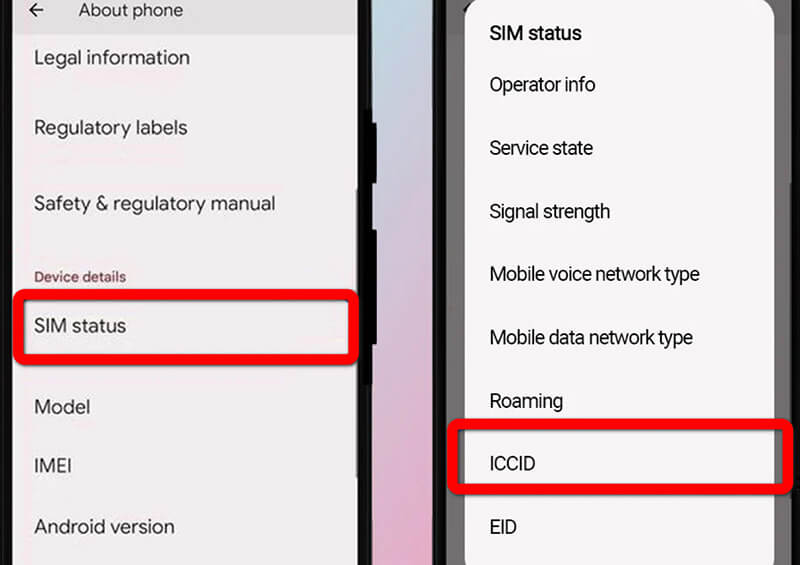
Go to Settings > About Phone > Status. Look for an entry called Network or SIM status. If it says Network Locked, your phone is carrier-locked.
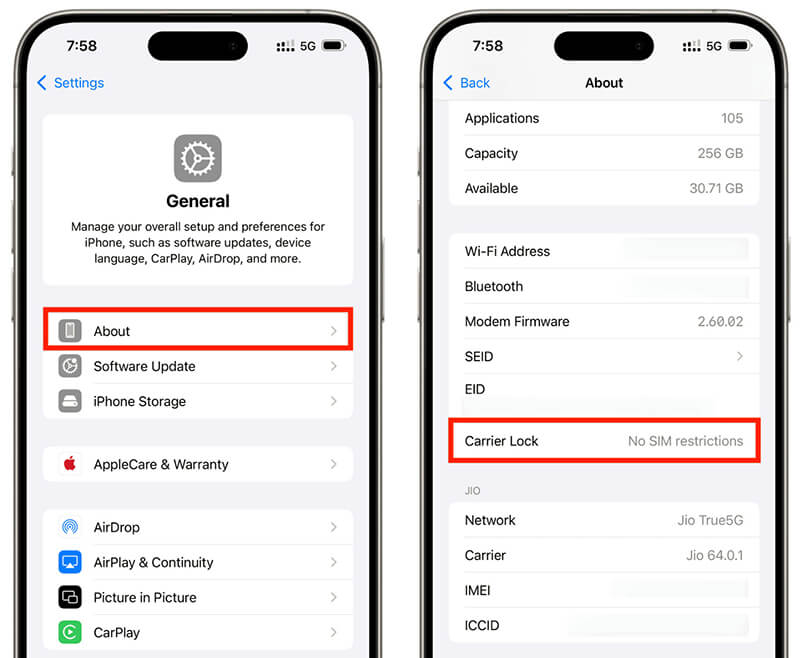
• For iPhone:
Go to Settings > General > About. Scroll down and check for Carrier Lock. If it says No SIM restrictions, then your phone is unlocked. If it lists any carrier restrictions, your phone is locked.
If your phone is locked, don’t worry, and there are ways to unlock it!
Once you've confirmed that your phone is locked to a particular carrier, you can start the unlocking process. There are a few methods to unlock your phone, including using the official, network-based route (always the best), and the third-party route for those tricky situations.
The absolute best and safest way to get a SIM carrier unlock is to go straight to the source: your mobile carrier. This gives you a permanent, official factory unlock SIM carrier network status that will never be reversed.
Most carriers have strict rules for any smartphone (Android or iOS). You usually need to have:
• Paid off the phone completely (no remaining payment plan balance).
• Used the phone on their network for a minimum required period (often 40–60 days).
• A clean account (no reports of loss, theft, or fraud).
Call their customer service line, visit a store, or, often easiest, fill out an online unlock carrier request form. Since you’ve paid for the phone, you are entitled to the how to unlock iPhone SIM carrier free service (which applies to Androids, too).
This is the hard part: waiting. It can take anywhere from a few hours to 10 business days for the carrier to process your request and update the global device database.
Once your carrier confirms the SIM carrier unlock has been processed, the final step involves connecting the device to a foreign network.
For any device: Simply insert a SIM card from a new carrier and restart the device while connected to Wi-Fi. The new carrier signal will complete the process.
For Apple devices: If you don't have a new SIM, connecting to a computer running iTunes or Finder may be required to register the carrier unlock no SIM restrictions of how to unlock status with Apple’s global servers.
Sometimes, contacting the original carrier is impossible, and maybe you bought the phone used from a different country or the seller is unreachable. In these complex scenarios, an unlock phone SIM carrier lock tool or service might be necessary.
The only truly reliable third-party path for a permanent SIM carrier unlock involves a service that uses your phone's IMEI number to submit the unlock request to the carrier's database. This works for both Android and iOS devices.
Dial *#06# on any phone to instantly retrieve your 15-digit IMEI number.
For more ways of checking your iPhone IMEI number online, you can find it here.
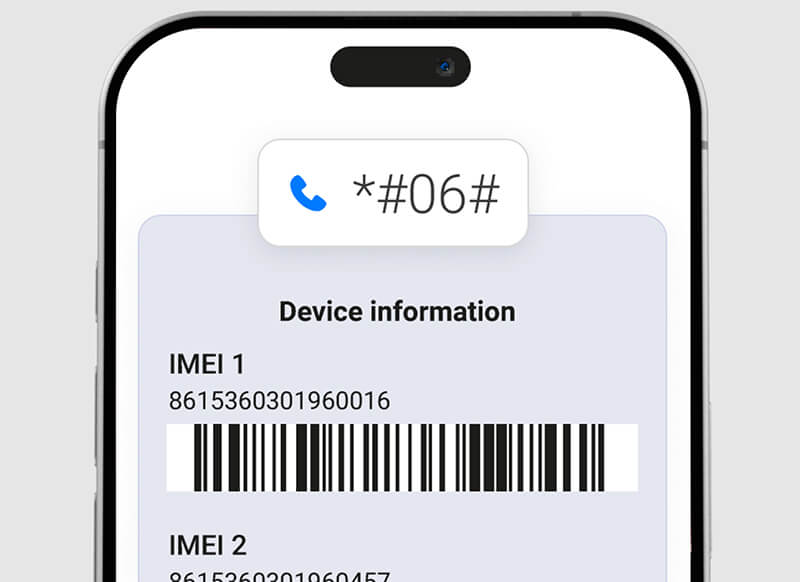
Find a highly-rated, professional SIM carrier unlock service. They usually require a fee, but they save you the headache of dealing with an uncooperative or distant original carrier. Reputable services often mentioned in reviews include:
DirectUnlocks: A service known for supporting both iOS and Android devices across most major global carriers.
MobileUnlocks: Focused on secure, IMEI-based unlocking using carrier-supported standard processes.
doctorSIM (or similar long-established sites): Provides reliable factory unlock sim carrier network status by interfacing with carrier databases.
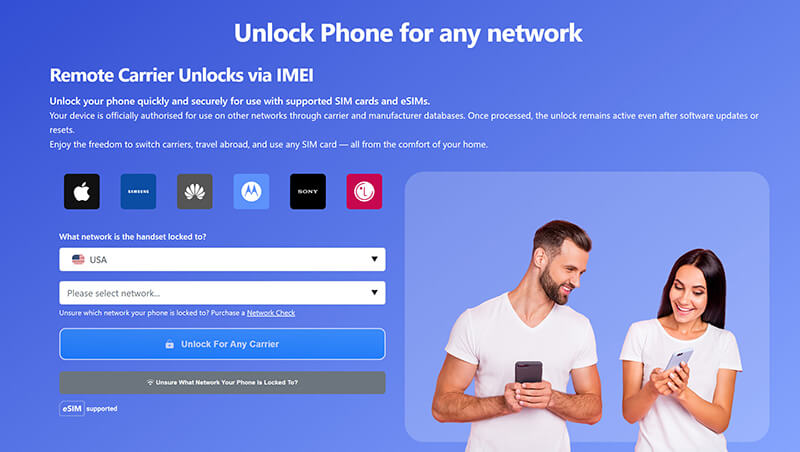
Enter your IMEI, select the original carrier the device is locked to, and pay the required fee.
Once the service confirms the request is complete, you’ll get an email. The final step is usually the same as the official route: insert a new SIM card to finalize the unlock.
The above steps are all what how you can unlock iPhone with IMEI number.
Always be extremely careful when choosing a third-party service. Many tools claiming a how to unlock iPhone SIM carrier free solution are simply scams. Before paying, use the service's IMEI checker to confirm two things:
A PUK code is typically used when you've entered your SIM PIN incorrectly multiple times, causing the SIM to lock. However, it’s important to note that the PUK code only unlocks the SIM card, not the carrier lock. To unlock your SIM using the PUK code, follow these steps:
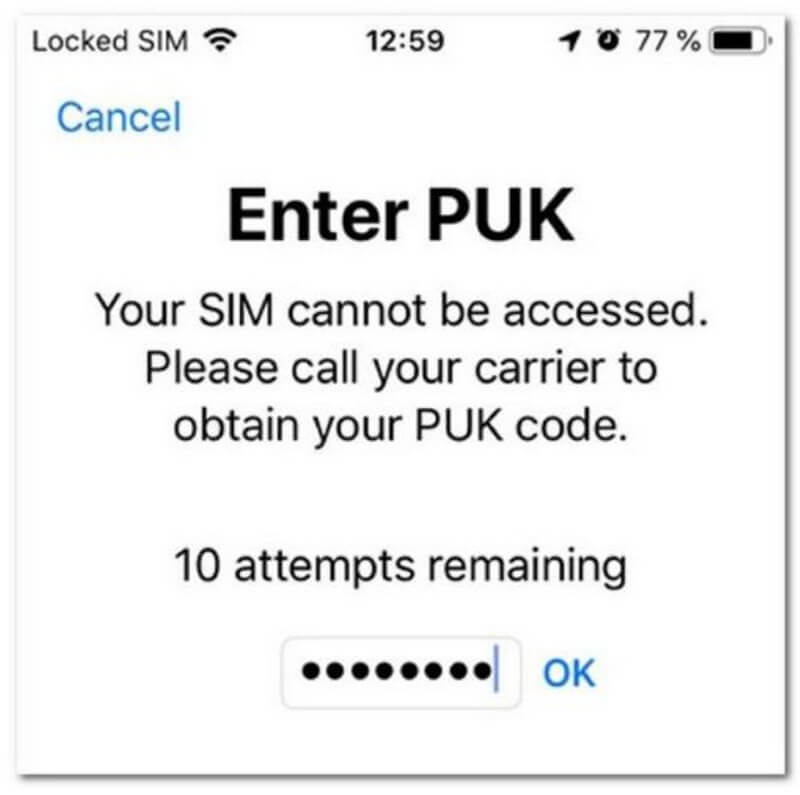
If you came here looking for a SIM carrier unlock but realize your problem is a forgotten screen passcode or a locked Apple ID, then a different kind of software tool is what you need!
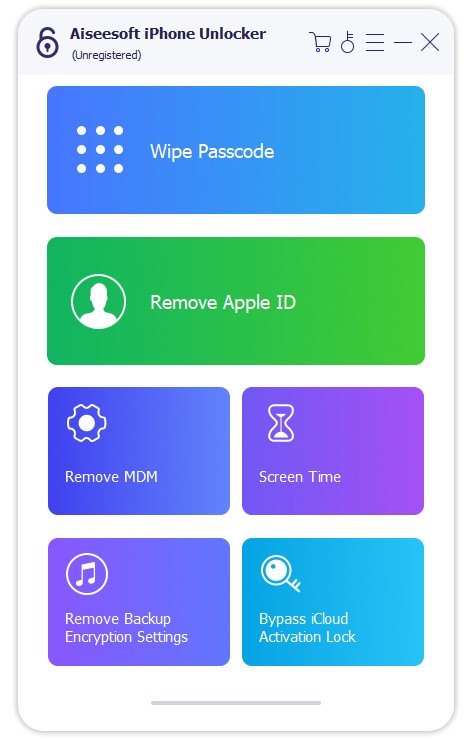
While Aiseesoft iPhone Unlocker does not perform a SIM carrier unlock, it is an excellent tool for dealing with other common iPhone locks:
• Screen passcode removal: Forgot the 4-digit or 6-digit passcode? This tool can wipe it clean.
• Apple ID removal: If you bought a used phone and it's still linked to the previous owner's Apple ID (a huge hassle!), Aiseesoft can help you remove it without needing the password.
• Screen Time/Restrictions: It can also help you bypass forgotten Screen Time passcodes on iOS devices.
So, if your device is carrier unlocked but you can't get past the lock screen, this software is the perfect bonus tool to have in your digital toolbox!
100% Secure. No Ads.
100% Secure. No Ads.
Q: Can I unlock my phone for free?
Yes, it’s possible to unlock your phone for free, especially if you’re dealing with your carrier. Many carriers will unlock your phone for free once you meet certain conditions, like completing your contract or paying off your phone. However, third-party software often requires a purchase.
Q: How long does it take to unlock my phone?
The time it takes to unlock your phone varies. Carrier unlocking might take a few hours to a few days, while third-party software typically takes 10-30 minutes, depending on the phone model and the method used.
Q: What is a carrier lock?
A carrier lock means that your phone is tied to a specific carrier, and you cannot use it with another carrier’s SIM unless you unlock it. For example, if you buy a phone from Verizon, it will usually be locked to Verizon’s network, preventing you from using a T-Mobile or AT&T SIM until it is unlocked.
Q: Can I unlock my phone if I don’t have the original carrier?
Yes, some third-party tools can unlock phones even if you don’t have access to the original carrier. However, this may be trickier depending on the carrier and the phone model.
Q: What’s the best tool to unlock my phone?
There are several good options, depending on your phone and operating system. Aiseesoft iPhone Unlocker is great for iPhones, while Dr.Fone and UnlockGo are excellent choices for Android phones. Make sure to choose a reliable tool with good reviews to avoid scams.
Conclusion
You are now equipped with the knowledge to handle any carrier lock situation like a pro, whether you own the latest Galaxy, Pixel, or iPhone. Knowing how to unlock your phone's SIM carrier is a seriously valuable skill, especially if you travel often or want the flexibility to switch networks. Remember the golden rule: start with your original carrier for the official, permanent, factory unlock. Achieving that No SIM Restrictions status is a great feeling, and it completely frees your smartphone from its old contract life. And if you encounter a screen or Apple ID lock along the way, don't forget the handy help offered by tools like Aiseesoft iPhone Unlocker to fully restore access to your device. Go forth and enjoy your newly freed device!
 Best Ways to Carrier Unlock Android Phone
If you want to unlock your Android phone from the current carrier and switch to a new one, you can learn the detailed ways here.
 2 Effective Ways to Unlock a Verizon Phone in Various Situations
Verizon prefer to lock smartphones for the initial days after purchase. We shared several ways to help you unlock a Verizon iPhone or Android phone in order to use another carrier.
 [100% Done] 7 Ways to Unlock an iPhone without Passcode
You recently changed your passcode on your iPhone, and you forgot it already. You can still access it with these solutions on how to get into a locked iPhone.
 Leave your comment and join our discussion
iOS Unlock Tips
Unlock iOS Screen
Bypass iOS Activation Lock
Recover iOS Data

To fix iPhone screen locked, wiping password function can help you a lot. And you also can clear Apple ID or Screen Time password easily.
100% Secure. No Ads.
100% Secure. No Ads.

*Required field
*Please enter a valid email

