Aiseesoft iPhone Unlocker
 100% Secure. No Ads.
100% Secure. No Ads.
If you're tired of being stuck with a single carrier and want to use your phone with any network, you’re not alone. But the good news is, unlocking your phone from a carrier might be easier and cheaper than you think. In this guide, just forget those sketchy, expensive third-party websites promising a magic fix. We’re going to look at the official, legal, and (most importantly) free way to get that device freedom. Now, let’s learn how to unlock a phone from a carrier for free, and get your phone ready for the open road!
First things first, let’s clear up the lingo.
When we say a phone is "locked," it means the device has been coded by your current mobile provider (like Verizon, T-Mobile, AT&T, or Sprint) to only work with their network’s SIM cards. Think of it like a smart lock on a front door that only accepts one specific key (your carrier's SIM).
Why do carriers do this?
The main reason is simple: money and contracts. When you get a new phone through a payment plan, the carrier is essentially subsidizing (paying for a part of) the phone’s cost, and they want to make sure you stick around long enough for them to recoup that cost through your monthly service payments. Locking the phone keeps you tied to their network until you meet the requirements of your contract.
When a phone is locked, you won’t be able to use a different SIM card from another carrier without first unlocking it.
The big question: Can you unlock a phone from a carrier for free?
The answer is YES, but with a few important conditions.
In fact, most carriers in the US and globally are required by law or industry agreements to let you unlock phone carrier free once you meet specific criteria. This is fantastic news because it means you don’t have to shell out $50 or $100 for an unofficial service. The process involves your carrier giving you a special code (or pushing an unlock command over the network) that removes the lock forever.
While it is genuinely free, you do need to meet the prerequisites set by your carrier. They are usually pretty similar across all major providers:
1. The phone is fully paid off:
This is the big one. If you are still making payments on the device or paying off a two-year contract, they likely won't unlock it.
2. The contract is fulfilled
If you had a service contract, it must be complete.
3. The account is in good standing
No past-due bills or fraudulent activity.
4. A specific waiting period has passed
Some carriers require you to have had the device active on their network for a certain amount of time (e.g., 40–60 days).
If you can check all those boxes, you are ready to learn how to unlock phone carrier free!
Before you begin the process of unlocking your phone, there are a few things you need to know:
• Phone eligibility: To unlock a phone for free, it typically needs to be paid off or have met the carrier’s eligibility requirements. Some carriers may only unlock phones that are at least 60 days old.
• Account standing: Your account with the carrier needs to be in good standing (i.e., no overdue payments or penalties).
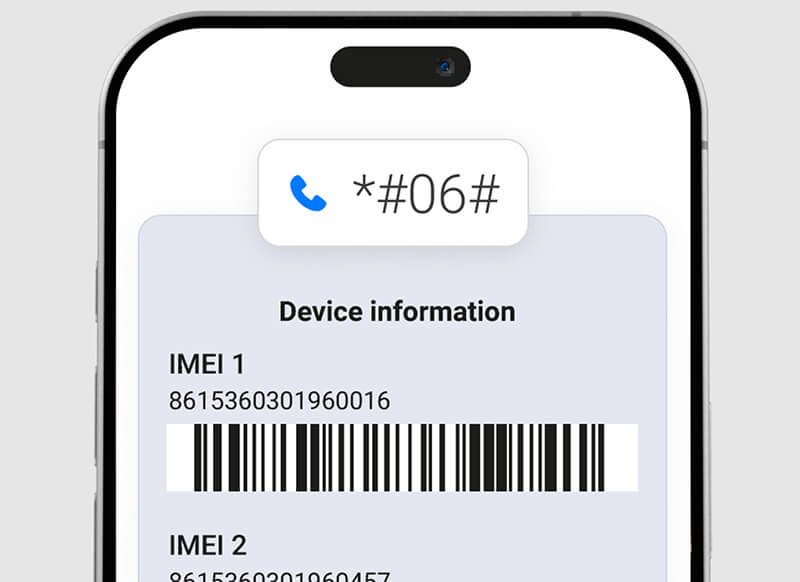
• IMEI number: You'll just need to grab your phone's IMEI number. It’s basically a unique ID for your specific device, and we need it to make the unlock happen.
You can check your phone’s IMEI number by dialing *#06# on your device or looking in the phone's settings under "About Phone."
Here are the steps to unlock your phone for free using your carrier’s official process:
I recommend using the carrier’s online chat support first, as it allows you to copy and paste the information they request and keeps a transcript. If that fails, call their dedicated unlocking or technical support line. Be polite and clear about your request.
State clearly: “I would like to request an unlock code/procedure for my device with IMEI [Insert IMEI Here]. I believe it meets all the criteria to be unlocked for free.”
The representative will verify your account, confirm the device is paid off, and ensure your account is in good standing. This is where your gathered prerequisites come in handy!
If the request is approved, they will process the unlock.
• For iPhones: The unlock is usually applied remotely within hours to a few days. You’ll be instructed to connect to Wi-Fi, insert the new SIM card, or sometimes plug into iTunes/Finder to complete the activation.
• For Android Phones: They will email you a numerical "Device Unlock Code" (DUK) within 2 to 10 business days.
Once you have the code, it’s time for the moment of truth!
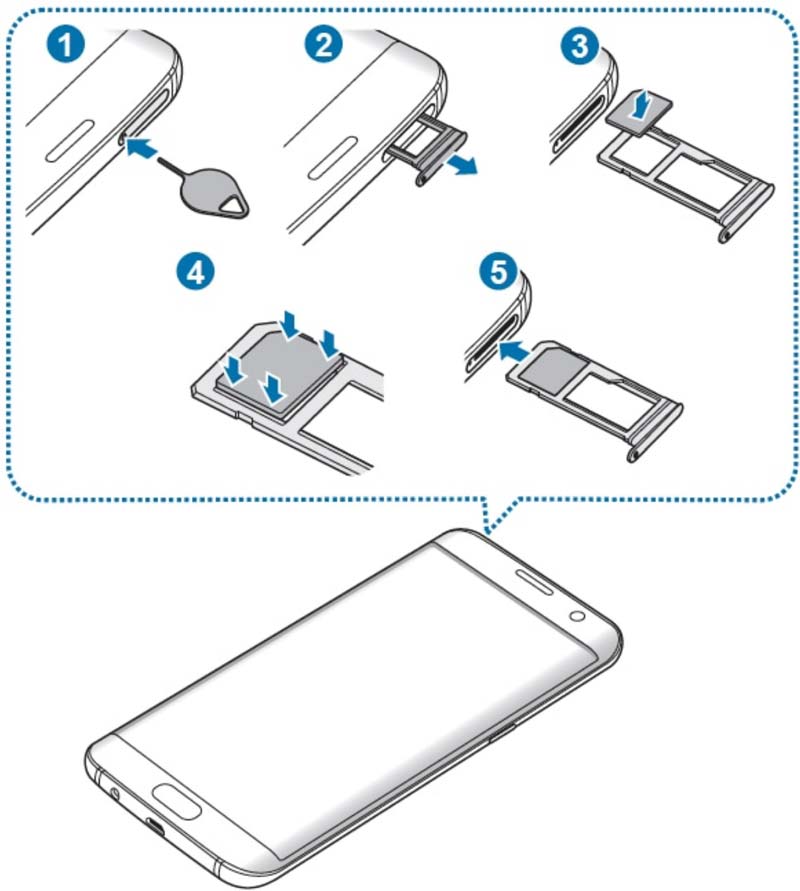
1. Power off your phone.
2. Remove your old carrier's SIM card.
3. Next, pop in a SIM card from a different carrier, and this step is actually super important!
4. Power the phone back on.
5. Your phone should immediately prompt you to enter the unlock code/DUK. Go ahead and punch in the code just like it appears in the message from your provider.
The above steps are how you unlock phone carrier with IMEI. If successful, you’ll see a message like "Unlock Successful" or "Network Unlocked." Congratulations! You now know how to unlock a phone from a carrier for free and own a device that’s truly yours.
While the carrier route is the only way to genuinely unlock phone from carrier free, sometimes people look at third-party software to remove other types of iPhone locks. Tools like Aiseesoft iPhone Unlocker are great for removing other kinds of locks. It is designed to help with scenarios like:

Downloads
100% Secure. No Ads.
100% Secure. No Ads.
Will unlocking my phone void my warranty?
No, asking your carrier for an official unlock code based on their policy is a standard procedure and will not void any remaining manufacturer or carrier warranties.
How long does it take to unlock a phone from a carrier for free?
It can take anywhere from a few minutes to a couple of days, depending on the carrier’s policies. Some carriers unlock your phone instantly, while others may take a few business days to process the request.
Can I unlock a phone that’s still under contract?
It’s possible, but it depends on the carrier. Many carriers will not unlock a phone that’s still under contract unless the contract has been fulfilled or the phone is fully paid off. You’ll need to contact your carrier for more details.
What if I enter the unlock code wrong?
Be careful! Most phones give you a limited number of tries (usually 5 to 10). If you fail too many times, the phone can become permanently "hard-locked," meaning you'll have to send it to a specialized repair center. Double-check the code before entering!
What if my carrier refuses to unlock my phone?
You can always wait a bit and ask again once you tick all their boxes. If you're in a hurry, third-party services are an option, just keep in mind that you’re doing so at your own risk.
Conclusion
Unlocking your phone from a carrier for free is completely possible, and it can give you the flexibility to switch networks or use your phone while traveling abroad. Whether you go through your carrier’s official unlocking process or use third-party options, the key is making sure your phone meets the necessary requirements.
If you run into issues with iCloud activation or forgotten screen locks on an iPhone, tools like Aiseesoft iPhone Unlocker can help you unlock your device, allowing you to regain full control over your phone. Just remember, for carrier locks specifically, it’s usually best to start with your carrier’s official unlocking process first.
 3 Proven Ways on How to Unlock Your Mobile Phone Without Passcode
How to unlock codes for SIM card on cell phones like Samsung, LG, Nokia, iPhone, etc. for free? Read through this post to unlock SIM with free codes for your phone.
 [Solved] Free SIM Network Unlock Pin for Samsung Galaxy
Want to get a free SIM network unlock pin for AT&T or T Mobile? Read this post and learn to unlock your Samsung Galaxy S6/S5/S4/S3, HTC One with SIM network unlock PIN. It is very useful.
 Actionable Methods to Unlock Your Apple ID in Various Situations
It is annoying if your Apple ID is locked due to a variety of reasons. Fortunately, you can follow our solutions to get your Apple ID unlocked easily.
 Leave your comment and join our discussion
iOS Unlock Tips
Unlock iOS Screen
Bypass iOS Activation Lock
Recover iOS Data
To fix iPhone screen locked, wiping password function can help you a lot. And you also can clear Apple ID or Screen Time password easily.
100% Secure. No Ads.
100% Secure. No Ads.

*Required field
*Please enter a valid email

