iPhone Data Recovery
 100% Secure. No Ads.
100% Secure. No Ads.
Accidentally deleting precious memories is a frustrating experience. If you have realized your photos are missing and you cannot find them anywhere, you might be wondering if they are gone forever. The good news is that "permanently deleted" doesn't always mean unrecoverable. Depending on how much time has passed and your backup settings, there are several reliable ways to get your pictures back. This comprehensive guide walks you through the best methods to recover permanently deleted photos on iPhone safely.
Accidentally deleting precious memories is a frustrating experience. If you have realized your photos are missing and you cannot find them anywhere, you might be wondering if they are gone forever. The good news is that "permanently deleted" doesn't always mean unrecoverable. Depending on how much time has passed and your backup settings, there are several reliable ways to get your pictures back. This comprehensive guide walks you through the best methods to recover permanently deleted photos on iPhone safely.
| Recovery Method | Success Rate | Risk of Data Overwrite | Cost | Requires Prior Backup? |
| Aiseesoft FoneLab iPhone Data Recovery | High (device scan-based) | Low | Paid (trial available) | No |
| iCloud Backup Restore | High | High (full device reset required) | Free (storage limits apply) | Yes |
| iTunes / Finder Backup | High | Medium–High | Free | Yes |
| Cloud Apps (Google Photos, Dropbox, etc.) | Medium–High | Low | Freemium | No |
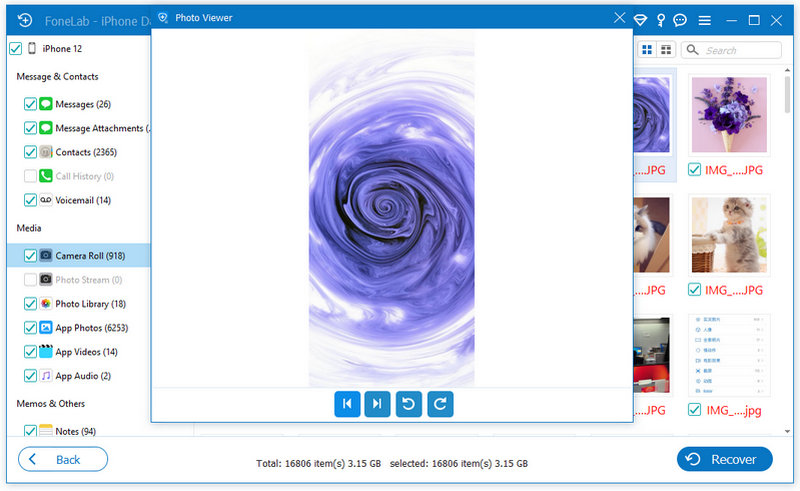
One of the most effective ways to recover permanently deleted photos without relying on backups is by using Aiseesoft FoneLab iPhone Data Recovery.
This professional recovery tool is designed to scan your iPhone’s internal storage and locate deleted photo data before it gets overwritten. It supports recovery from iPhone, iTunes backups, and iCloud backups, giving users multiple options depending on their situation. This method is especially useful when photos are no longer available in Recently Deleted and no recent backup exists.
Downloads
100% Secure. No Ads.
100% Secure. No Ads.
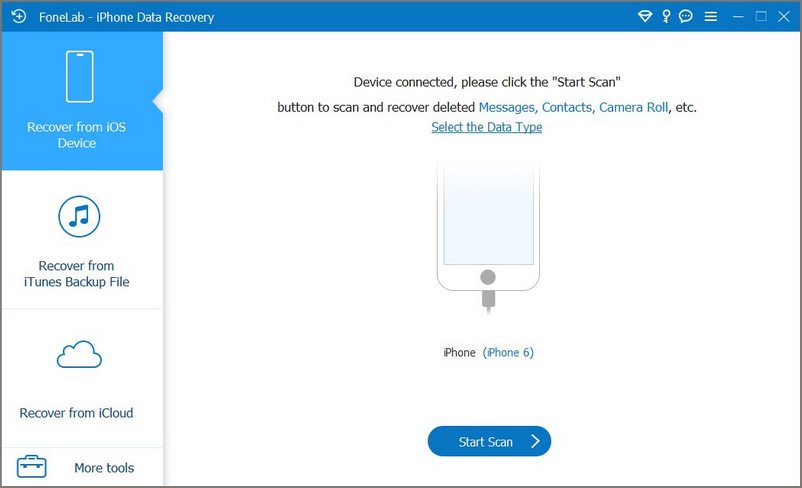
Steps to Recover Photos with Aiseesoft FoneLab iPhone Data Recovery:
If you regularly back up your iPhone using iCloud, your deleted photos may still exist inside a previous backup. However, restoring from iCloud requires erasing your current device first because Apple only allows full backup restoration during initial device setup.
Steps to Restore from iCloud Backup:
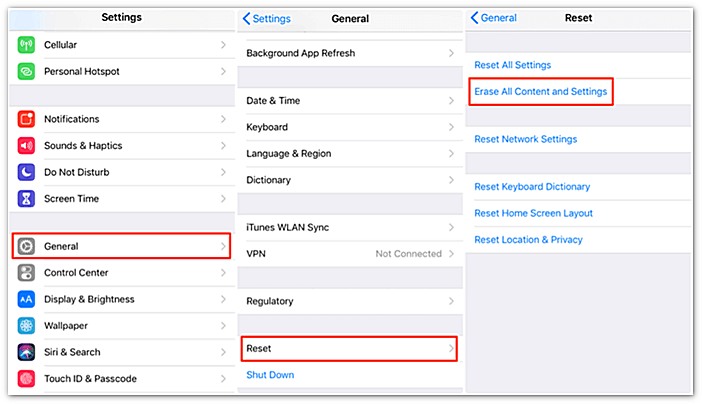
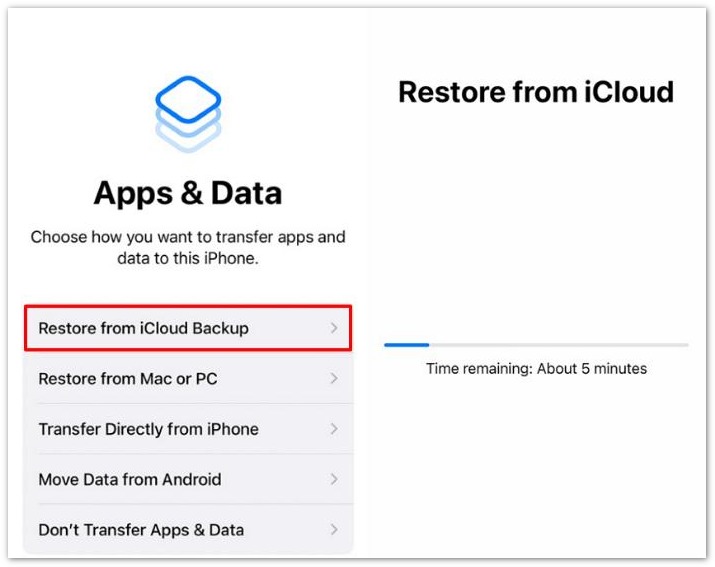
Note: This method replaces your current iPhone data with the selected backup, so creating a fresh backup first is strongly recommended.
If you previously backed up your iPhone to a Mac or Windows PC, you may be able to restore deleted photos using iTunes (Windows or older macOS) or Finder (macOS Catalina and later). Like iCloud restoration, this process restores the entire backup rather than individual files.
Steps to Restore via iTunes or Finder:
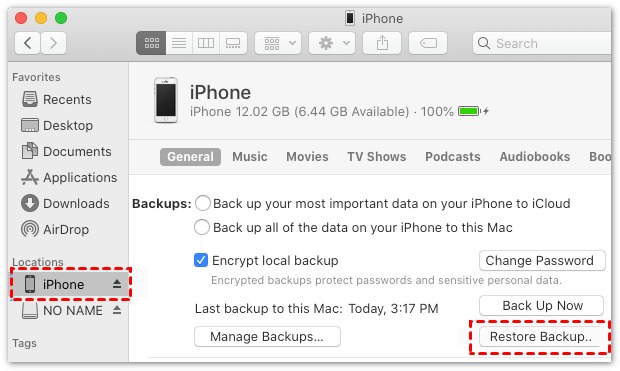
This method works well if you prefer local backups instead of cloud storage.
Sometimes your photos are saved elsewhere without you realizing it. Take a moment to check alternative paths:
Cloud Apps: Open Google Photos, Microsoft OneDrive, or Dropbox to see if automatic camera roll syncing was active.
Chat History: Search your conversation media threads in WhatsApp, iMessage, or Telegram. If you shared the photo with a friend, you can easily re-download it from the chat.
If you can’t fine your permanently deleted photos on iPhone in this way or from backup, you can still use Aiseesoft iPhone Data Recovery as a final resort.
100% Secure. No Ads.
100% Secure. No Ads.
Can I recover photos deleted 1 year ago?
Yes, but only if they exist in a backup or cloud storage or have not been overwritten yet. Without backups, recovery becomes unlikely because new data likely overwrites the deleted files.
Where do permanently deleted photos go on iPhone?
After leaving the ‘Recently Deleted’ folder, photos are removed from visible storage and marked for overwrite in the system’s file space. They may still exist temporarily in device memory until replaced by new data.
Does restoring from iCloud delete current data?
Yes. Restoring from an iCloud backup requires erasing your current iPhone first. After the reset, the selected backup replaces your existing data, including photos, messages, apps, and settings. That’s why many users prefer using a recovery tool first before trying full backup restoration.
Conclusion
Recovering permanently deleted iPhone photos depends heavily on whether backups or cloud sync were enabled. If no backup exists, specialized recovery tools like Aiseesoft FoneLab iPhone Data Recovery offer the most practical chance of retrieving lost data through deep device scanning.
100% Secure. No Ads.
100% Secure. No Ads.
However, for the highest success rate, combining recovery tools with cloud and backup checks gives the best overall results.
 Photos Disappeared from iPhone Suddenly? 7 Proven Fixes Here
My photos disappeared from my iPhone. Why? Read this post and learn how to fix the issue of photos disappearing on iPhone (new iPhone 17 series included).
 How to Transfer Photos from iPhone to iPhone
Want to move photos from old iPhone to new one? You can learn how to transfer photos from iPhone to iPhone/computer/Mac in this post.
 Easy Ways to Extract Photos from iPhone Backup Without Losing Data
Discover simple methods to extract photos from iPhone backup safely. Learn how to get your photos from iCloud, iTunes, or use tools without losing data.
 Leave your comment and join our discussion
Recover Data from iPhone/iPad/iPod
Recover Deleted Photos from iPhone Recover Deleted Notes on iPhone Recover Deleted Voicemail on iPhone Recover Deleted Messages from iDevice Recover Deleted Voice Memos from iDevice WhatsApp Recovery on iPhone Recover Deleted Contacts on iPhone Retrieve Deleted Text Messages from iPhone Recover Permanently Deleted Photos from iPhone Best iPhone Data Recovery Software Recover Deleted Emails on iPhone How to Recover Calendar from iPhone Best iPhone Photo Recovery Best iPhone Message Recovery App
The best iPhone data recovery software ever, allowing users to safely recover lost iPhone/iPad/iPod data from iOS device, iTunes/iCloud backup.
100% Secure. No Ads.
100% Secure. No Ads.

*Required field
*Please enter a valid email

