Screen Recorder
 100% Secure. No Ads.
100% Secure. No Ads.
With the release of major titles like Pokémon Legends: Z-A and new updates to mobile favorites, capturing high-quality Pokémon Go gameplay footage has become a priority for trainers. While most devices offer built-in recording, they often come with limitations regarding duration, video quality, and system strain. This guide analyzes the standard recording methods for PC, Switch, and Mobile, and provides professional alternatives for a superior result.
How We Test & Review
We tested all the open-source screen recorders on multiple Windows devices to evaluate performance.
Each tool was used for screen capture, webcam overlay, and audio input to reflect real scenarios. We explored editing and export features, including trimming, annotations, and format options, for a complete review.
Finally, recordings were assessed for resolution clarity, playback smoothness, and audio quality to ensure fair comparison.
| Pokémon Go Recording Methods | Best for | Disadvantages | Advantages |
| Windows Game Bar (Win+G) | PC & Emulator Players | It has few editing options and is resource-heavy, causing frame drops in the emulator. | Completely Free & Built-in; It can be summoned instantly with a simple keyboard shortcut, allowing capturing unexpected gameplay moments without prior setup. |
| Holding the "Capture" button on the Joy-Con | Nintendo Switch Players | The Switch is hard-coded to save only the last 30 seconds of gameplay. For trainers wanting to record a full Gym Leader battle or a complete walkthrough, the built-in feature is insufficient. | Zero Setup Required; Captured clips can be sent directly to your smartphone or posted to social media platforms directly from the Switch album. |
| Using the native iOS or Android screen recording toggle | Mobile Players (Pokémon GO / UNITE) | Pokémon GO is an intensive app. Simultaneous recording often leads to device overheating, which triggers CPU throttling and causes the game to lag. Furthermore, long HD videos quickly consume limited phone storage. | Captures high-fidelity game sound directly without an external mic; Record Pokémon GO outdoors without being tethered to a PC or extra hardware; Start recording in just two taps via the Control Center or Quick Settings. |
| Aiseesoft Screen Recorder | For All Players | For Switch players, you need a physical Capture Card to use it. | Lock onto specific game windows with Game Recorder to multitask without interruption, or cast your mobile screen wirelessly to your PC to record lag-free. Enjoy unlimited 4K capture with live commentary while keeping your devices cool. |
If you are playing Pokémon on a PC emulator (like MelonDS or mGBA) or a Windows-based fan game, the Windows Game Bar is the most convenient, pre-installed tool for quick captures. Here’s how to do it:
As you can see, you can summon this tool instantly with a keyboard shortcut. If you just want to capture casual Pokémon Go gameplay moments, this is a good option. But if you use it to record longer footage, it may cause frame drops in emulators. And if you prefer advanced audio mixing or bit-rate control, this won’t satisfy you. And you’d better try other best game recording software like Aiseesoft Screen Recorder to meet higher demands.
100% Secure. No Ads.
100% Secure. No Ads.
For Nintendo Switch players, the most direct way to save gameplay moments without extra equipment is using the built-in Capture button. This is ideal for quickly saving "retroactive" highlights, such as catching a Shiny Pokémon. See the steps below:
This method requires no cables or PC, and it allows you to save a moment after it has already happened. After capturing, you can easily transfer clips to your phone or social media. However, it cannot record long battles, full walkthroughs, or your voice while playing. If you want more advanced recording features, it is necessary to try Aiseesoft Screen Recorder with a compatible Capture Card.
100% Secure. No Ads.
100% Secure. No Ads.
For mobile trainers, the most straightforward way to record is by using the native screen recording feature built into iOS and Android. This is perfect for capturing high-fidelity internal audio without needing external hardware.
Steps to capture Pokémon Go on iOS:
Steps to capture Pokémon Go on Android:
Using the built-in recording features, you can record Pokémon GO outdoors without being tethered to a PC or extra hardware. It also enables you to capture high-fidelity game sound directly without an external mic. If your phone begins to lag or overheat during long recording sessions, consider using Aiseesoft Screen Recorder to record your phone screen instead.
100% Secure. No Ads.
100% Secure. No Ads.
If you want to move beyond the 30-second limit of the Switch, the overheating issues of mobile phones, or the high CPU usage of Game Bar, Aiseesoft Screen Recorder is the professional solution for recording Pokémon Go battles. It provides a stable, high-performance environment for creating long-form Pokémon content.
Why You Choose It:
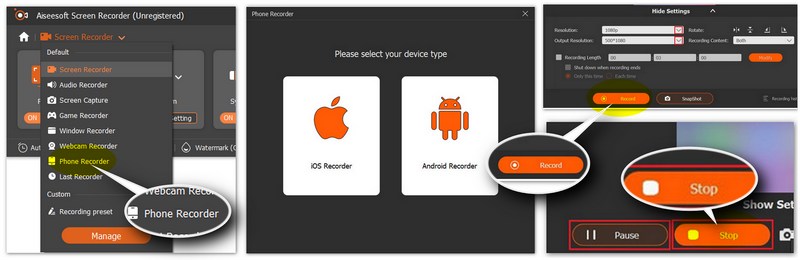
1. Its dedicated "Game Recorder" mode locks onto the specific game window, ensuring your recording is not interrupted even if you switch to a browser to check a Type-effectiveness chart.
2. Allows for unlimited 4K recording with live commentary support and hardware acceleration for zero lag.
3. Includes a feature to cast your phone screen wirelessly to your PC to record gameplay directly to your hard drive, keeping your mobile device cool and responsive.
100% Secure. No Ads.
100% Secure. No Ads.
How to record Pokémon gameplay using Aiseesoft Screen Recorder for PC & Emulators?
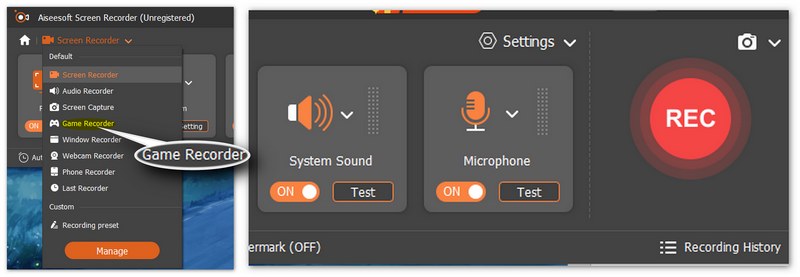
How to capture Pokémon Gameplay using Aiseesoft Screen Recorder for mobile?
How to record Pokémon Go game using Aiseesoft Screen Recorder for Nintendo Switch?
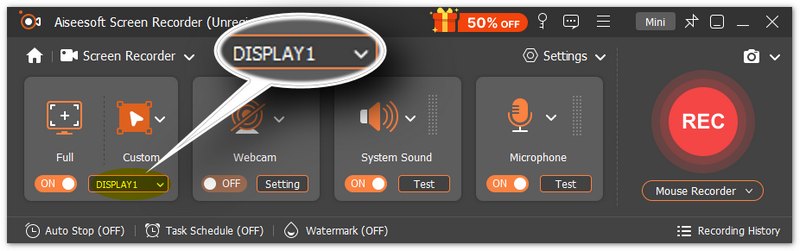
Does recording Pokémon gameplay cause frame drops?
Using Aiseesoft Screen Recorder with hardware acceleration significantly reduces CPU load. You can record high-intensity battles in 60FPS without experiencing the lag common in free software.
Can I record Pokémon GO on my Nintendo Switch?
No. Pokémon GO is a mobile-only game. While you can connect Pokémon GO to Switch titles (like Pokémon Scarlet/Violet or Let's Go, Pikachu!) to transfer Pokémon, the game itself does not run on the Switch hardware. You must record it via your phone or by mirroring your phone to a PC.
Is it legal/safe to record and post Pokémon GO gameplay on YouTube?
Generally, yes. The Pokémon Company and Niantic allow fans to share gameplay videos. However, avoid showing private information on screen.
Conclusion
Whether you are a casual player or an aspiring content creator, choosing the right Pokémon gameplay recording method depends on balancing convenience with quality: while native tools like the Switch’s capture button or mobile system toggles are perfect for quick, spontaneous highlights, they often struggle with time limits and device overheating. For those seeking professional, long-form content, a dedicated solution like Aiseesoft Screen Recorder provides the stability needed to bypass these hardware constraints, offering unlimited 4K recording and seamless phone mirroring to ensure your Pokémon adventures are captured in the highest possible fidelity without compromising game performance.
100% Secure. No Ads.
100% Secure. No Ads.
 Review &Tutorial of Bandicam Screen Recorder to Capture Screen on Windows
Want to record games with full screen? Bandicam Screen Recorder can do you a great favor. In this post, we will have a thorough review of Bandicam Screen Recorder.
 Screen Recorder No Root Apk to Record Android Screen
Want to record Skype calls on Android? We recommend top 5 screen recorder no root apks to help you capture Android screen activity in this post.
 Top 10 GIF Screen Capture Software for Windows and Mac Users
You can make GIF animations by yourself from the beginning. It is super easy to create GIF from screen capture. All you need is a good GIF screen capture program. Here're the latest recommendations for you.
 Leave your comment and join our discussion
Record Games
Game Capture Game Recording Software Video Game Recording Software Record Diablo 3 Gameplay Record League of Legends Record PS3 Gameplay Record Xbox 360 Games Record Pokemon Game Record Minecraft Games Record Roblox Game Record SWF Games Record Gameplay on Windows Record CSGO Gameplay LoiLo Game Recorder Watch and Record Replays on Fortnite Record Overwatch Highlights Record Gameplay on Switch Record VR Gameplay
Aiseesoft Screen Recorder is the best screen recording software to capture any activity like online videos, webcam calls, game on Windows/Mac.
100% Secure. No Ads.
100% Secure. No Ads.

*Required field
*Please enter a valid email

