 For Windows
 For Mac
 PDF Solutions
 Data Manager
 Other Tools
 Free Image Tools
 Desktop Freeware
Convert any video and audio files with various editing features.
Monthly: $29.00 $14.50

 Free Online Solutions

Buy now with 50% OFF!
Monthly: $25.00 $12.50
 BUY NOW50%OFF
BUY NOW50%OFF
BUY NOW50%OFF
BUY NOW50%OFF
BUY NOW50%OFF
30-Day Money Back GuaranteeIf there is a quality problem within 30 days after purchasing, we can promise you a refund.

All-in-one Bundle - Up to 83% OFF
Blu-ray Player + DVD Creator + Data Recovery + FoneTrans + PDF Converter Ultimate + Screen Recorder + Android Data Recovery + iPhone Data Recovery + Video Converter Ultimate + iPhone Cleaner
Price: $314.85 $69.00
Price: $659.60 $119.00
 BUY NOW77%OFF
BUY NOW77%OFF
BUY NOW77%OFF
BUY NOW77%OFF
BUY NOW77%OFF
30-Day Money Back GuaranteeIf there is a quality problem within 30 days after purchasing, we can promise you a refund.
BUY NOW77%OFF
BUY NOW77%OFF
BUY NOW77%OFF
30-Day Money Back GuaranteeIf there is a quality problem within 30 days after purchasing, we can promise you a refund.
BUY NOW83%OFF
BUY NOW83%OFF
BUY NOW83%OFF
30-Day Money Back GuaranteeIf there is a quality problem within 30 days after purchasing, we can promise you a refund.
BUY NOW83%OFF
BUY NOW83%OFF
BUY NOW83%OFF
30-Day Money Back GuaranteeIf there is a quality problem within 30 days after purchasing, we can promise you a refund.
10-Second Start Complete User Guide
01 Run Aiseesoft Game Recorder
Run Game Recorder on your computer and click "Screen Recorder" if you want to record both video and audio, then you can see an interface as listed on the left.
READ THE FULL GUIDE HERE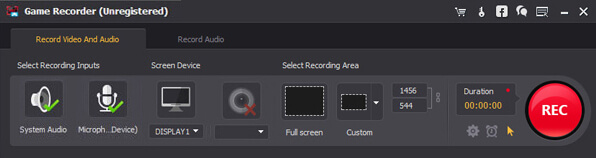
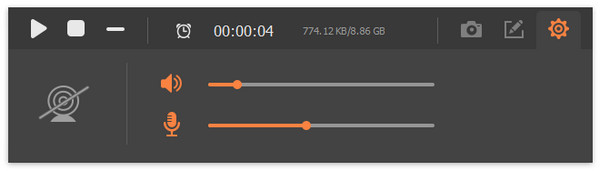
02 Record the on-screen gameplay with Game Recorder
Select the capture area with Game Recorder as you like. With the software, you can handily select the full screen or a customized recording region according to your need. Then just click the red "Rec" on the bottom-right corner of Game Recorder after the preparation is done.
READ THE FULL GUIDE HERE


*Required field
*Please enter a valid email


